記事公開日
Azure Content Understanding の RAGアナライザーを試してみた

こんにちは。
今回は、Azure AIサービスの中の Azure Content Understanding を試してみます。
Azure Content Understandingとは
Azure Content Understanding(コンテンツ理解)は、ドキュメント、画像、動画、音声などの非構造化コンテンツを分析し、構造化された検索可能なデータに変換するAIサービスです。
2025年11月の一般公開(GA)とともに新機能として紹介されていた RAGアナライザーが気になったので試してみます。
RAGアナライザーとは
RAGアナライザーは、Content Understanding での事前構築済みアナライザーの中の一つです。
事前構築済みアナライザーについては、こちらをご参照ください。
RAGアナライザーというだけあって、RAG(検索拡張生成/取得拡張生成)で使いやすいデータを生成してくれる機能です。
分析の種類によって、以下のものが用意されています。
| 分析種類 | アナライザーID | 概要 |
|---|---|---|
| ドキュメント | prebuilt-documentSearch | 文書データから文字情報や段落、表、図などのコンテンツとレイアウト要素を抽出します。画像、グラフ等から、図の説明を出力できます。 |
| 画像 | prebuilt-imageSearch | 画像を分析して、説明と分析情報を生成します。 |
| 音声 | prebuilt-audioSearch | 音声データ、動画データを分析して、文字起こしができます。 単純に文字起こしするだけでなく、話者を分割してくれます。 |
| 動画 | prebuilt-videoSearch | 動画データを分析して、文字起こしができます。動画を意味のあるセクションで自動的に分割できます。各セグメントの説明も出力されます。 |
ドキュメントに含まれる画像については、別ブログで Document Intelligence を使用して、画像部分に独自説明を生成して差し替える方法を紹介しましたが、このRAGアナライザーだけで同様のことが実現できそうです。
分析処理を試す
以下のようなコードで実行します。
処理結果は、API応答全体とコンテンツ部(マークダウン部分)を切り出したものを保存しています。
import requests
import json
import time

FOUNDRY_ENDPOINT = "https://xxxxxxxx.cognitiveservices.azure.com/"
FOUNDRY_KEY = "<Foundryキー>"
API_VERSION = "2025-11-01"

# 解析したいドキュメントのURL
document_url = "<解析ドキュメントの URL>"
analyzeId = "prebuilt-documentSearch"

# --- 1. 解析開始 (POSTリクエスト) ---
analyze_url = f"{FOUNDRY_ENDPOINT}/contentunderstanding/analyzers/{analyzeId}:analyze?api-version={API_VERSION}"

headers = {
    "Ocp-Apim-Subscription-Key": FOUNDRY_KEY,
    "Content-Type": "application/json"
}

body = {
    "inputs":[{"url": document_url}],
}

print("文書解析ジョブを開始します...")
response = requests.post(analyze_url, headers=headers, data=json.dumps(body))
print(response)

if response.status_code != 202:
    print(f"解析開始に失敗しました: {response.status_code}")
    print(response.text)
    exit()

# ジョブ結果を取得するためのURL
result_url = response.headers.get("operation-location")

# --- 2. 結果のポーリング ---
result_json = ""
result_content = ""

start_time = time.time()

status = "Running"
while status in ["Running", "NotStarted"]:
    time.sleep(5)

    result_response = requests.get(result_url, headers={"Ocp-Apim-Subscription-Key": FOUNDRY_KEY})
    result_json = result_response.json()

    status = result_json.get("status")
    print(f"現在のステータス: {status}")

    if status == "Succeeded":
        print("\n**解析完了**")
        result_content = result_json["result"]["contents"][0]["markdown"]
        break

    elif status == "Failed":
        print("\n**解析失敗**")
        print(result_json.get("error"))
        break

end_time = time.time()
elapsed_time = end_time - start_time
print(f"処理時間: {elapsed_time} 秒")

# 処理結果をファイルに出力
content_name =  "xxx"
output_json_file = f"result_{content_name}.json"
with open(output_json_file, "w", encoding="utf-8") as f:
    json.dump(result_json, f, ensure_ascii=False, indent=4)

if not result_content:
    result_content = "コンテンツを取得できませんでした。"
else:
    output_content_file = f"result_content_{content_name}.md"
    with open(output_content_file, "w", encoding="utf-8") as f:
        f.write(result_content)

    print(f"処理結果を({output_content_file}) に保存しました。")
① ドキュメント分析結果
別ブログで使用したQESマン文書を分析しました。
「スーパーヒーローQESマンの月曜日の憂鬱」(全5ページ)(➡PDF版)
著者: Azure OpenAI
# スーパーヒーロー QES マンの月曜日の憂鬱 平凡なヒーローの非凡な一日 月曜日の朝、QESマンは目覚まし時計のけたたましい音で目を覚ました。その音が彼の超 人的な聴覚に刺さるようだった。彼はスーパーヒーローでありながら、どうにもこの月曜日 という日に苦手意識を持っていた。世界を救う力はあっても、月曜日を快適にする力はまだ 発明されていない。窓を開けると、どんよりとした曇り空が広がり、さらに彼の気分を沈ま せた。  <!-- PageBreak --> 「今日も始まったな…」彼は深いため息をつきながら、スーツを手に取った。そのスーツは 彼のヒーロー活動を象徴するものであり、街の人々からは絶対的な信頼を寄せられていた。 しかしそのスーツを着る度に、責任の重さが肩にのしかかるような気がしてならなかった。 QESマンの朝のルーティンはいたって普通だった。朝食はいつものシリアルとコーヒー。 スーパーヒーローもエネルギー源が必要である。しかし、何かが違った。彼はスプーンで シリアルを食べながらも、その心はどことなく落ち着かない。「何か大きな問題が起きる 気がする…」彼は予感を拭い去ることができなかった。  <!-- PageBreak --> ## ミッションの開始  午前10時、QESマンの通信デバイスが鳴り響いた。「市内中心部で大規模な混乱が発生し ています。急行してください!」と緊急メッセージが届く。彼は一瞬ためらったものの、す ぐにスーツを身にまとい、空へと飛び立った。月曜日の憂鬱を吹き飛ばすように、彼はその 場へ向かう。 中心部に到着すると、巨大なロボットが暴れ回っていた。そのロボットは何者かによって遠 隔操作されているようで、「破壊」のみを目的としているようだった。QESマンはその場を 見渡しながら、どのように対処すれば効率的かを瞬時に計算した。「このロボットの制御装 置を見つけなければ!」彼は自分の能力を駆使して、ロボットの弱点を探した。 <!-- PageBreak --> ## 困難な選択 戦いの最中、QES マンはロボットの制御装置を発見した。しかしそれを破壊するには、近 くにいる市民を一時的に危険にさらさなければならない。彼は葛藤した。安全を優先するべ きか、それとも迅速に問題を解決するべきか。ヒーローとしての使命は彼を追い詰めた。  「決断するしかない!」彼は周囲の市民に避難を指示し、制御装置を狙った。数秒後、装置 は砕け散り、ロボットは動きを停止した。街は静寂を取り戻し、市民たちは安心した様子で 彼を称賛した。しかし、QESマンの心にはまだ何かが引っかかっていた。 <!-- PageBreak --> ### 月曜日の終わり その日の終わり、QESマンは自宅でコーヒーを飲みながら振り返っていた。「自分は本当に 正しい選択をしたのだろうか?」彼は自問自答を繰り返した。スーパーヒーローであること は、時に孤独で、時に心の重荷を伴うものだ。それでも、人々の笑顔を見ると、彼は少し救 われた気持ちになった。 「まあ、これが月曜日ってものさ。」彼は苦笑しながらカップを置き、ソファに身を沈めた。 次の月曜日がどうなるかは分からないが、今日の彼は確かに誰かの希望だった。 figure部分に、英語ではありますが画像の説明が入っていることが分かります。
上記は、マークダウン部分のみですが、レスポンスにはいろいろな情報が含まれています。
全量は長くなるため、一部省略した形ですが、以下ような応答が得られました。
ドキュメントの要約文、ページごとのワード、段落、画像情報などの分析結果があります。
{
    "id": "7a50c416-f576-414d-9d07-4fae6d7bc835",
    "status": "Succeeded",
    "result": {
        "analyzerId": "prebuilt-documentSearch",
        "apiVersion": "2025-11-01",
        "createdAt": "2025-11-24T11:32:01Z",
        "warnings": [],
        "contents": [
            {
                "path": "input1",
                "markdown": "# スーパーヒーロー QES マンの月曜日の憂鬱\n\n(・・・省略)\n",
                "fields": {
                    "Summary": {
                        "type": "string",
                        "valueString": "This document is a Japanese comic-style narrative depicting the ordinary yet challenging Monday of a superhero named QESマン.(・・・省略)\n",
                        "spans": [
                            {
                                "offset": 41,
                                "length": 41
                            },
                        ],
                        "confidence": 0.01,
                        "source": "D(1,1.1762,3.5656,7.0978,3.5677,7.0977,3.7534,1.1761,3.7512);",
                    }
                },
                "kind": "document",
                "startPageNumber": 1,
                "endPageNumber": 5,
                "unit": "inch",
                "pages": [
                    {
                        "pageNumber": 1,
                        "angle": -0.0194,
                        "width": 8.2639,
                        "height": 11.6806,
                        "spans": [
                            {
                                "offset": 0,
                                "length": 580
                            }
                        ],
                        "words": [
                            {
                                "content": "スーパー",
                                "span": {
                                    "offset": 2,
                                    "length": 4
                                },
                                "confidence": 0.712,
                                "source": "D(1,2.6551,1.5731,4.102,1.5764,4.102,1.8847,2.6551,1.8859)"
                            }
                        ]
                    }
                ],
                "paragraphs": [
                    {
                        "role": "title",
                        "content": "スーパーヒーロー QES マンの月曜日の憂鬱",
                        "source": "D(1,2.044,1.5741,6.225,1.5674,6.2268,2.6854,2.0458,2.6921)",
                        "span": {
                            "offset": 0,
                            "length": 24
                        }
                    },
                    {
                        "content": "平凡なヒーローの非凡な一日",
                        "source": "D(1,2.7217,3.0674,5.4801,3.0735,5.4797,3.2795,2.7212,3.2733)",
                        "span": {
                            "offset": 26,
                            "length": 13
                        }
                    }
                ],
                "sections": [
                    {
                        "span": {
                            "offset": 0,
                            "length": 3655
                        },
                        "elements": [
                            "/paragraphs/0",
                            "/paragraphs/1",
                            "/paragraphs/2",
                            "/figures/0",
                            "/paragraphs/5",
                            "/figures/1",
                            "/sections/1",
                            "/sections/2"
                        ]
                    }
                ],
                "figures": [
                    {
                        "source": "D(1,1.1641,4.8222,6.6014,4.8279,6.5893,10.2433,1.1641,10.2661)",
                        "span": {
                            "offset": 215,
                            "length": 342
                        },
                        "elements": [
                            "/paragraphs/3",
                            "/paragraphs/4"
                        ],
                        "id": "1.1",
                        "description": "- Speech bubble text: 'MONDAYS!'\n- Superhero costume: blue suit, red cape, red briefs\n- Chest emblem text: 'QES MAN'\n- Alarm clock on wooden drawer, ringing with motion lines\n- Window showing cloudy sky and birds\n- Superhero standing with clenched fists\n- No numeric scales, units, or category names present"
                    },
                },
                "analyzerId": "prebuilt-documentSearch",
                "mimeType": "application/pdf"
            }
        ]
    },
    "usage": {
        "documentPagesStandard": 5,
        "contextualizationTokens": 5000,
        "tokens": {
            "gpt-4.1-mini-input": 9750,
            "gpt-4.1-mini-output": 950
        }
    }
}
② 画像分析結果
画像分析では、このブログのカバー画像を分析してみました。
The image depicts a futuristic digital interface with a cute robot wearing purple headphones at the center. The robot is holding a book and is surrounded by various floating icons and graphical elements, such as documents, charts, envelopes, and music notes, all displayed in a holographic style. The background features a high-tech, grid-like environment with vibrant colors and light effects. Overlaid text in Japanese reads 'Azure Content Understanding の RAGアナライザーを試してみた,' which translates to 'Tried the Azure Content Understanding RAG Analyzer.'
(日本語訳 - DeepL)
画像は未来的なデジタルインターフェースを描いており、中央には紫色のヘッドホンをつけた可愛らしいロボットがいます。ロボットは本を持ち、周囲にはホログラフィックスタイルで表示された様々な浮遊アイコンやグラフィック要素(文書、チャート、封筒、音符など)が配置されています。背景には鮮やかな色彩と光効果を伴うハイテクなグリッド状の環境が表現されている。日本語で重ねられたテキストには「Azure Content Understanding の RAGアナライザーを試してみた」と記されている。
応答全体は、以下になります。
{
"id": "3ed29702-9e91-4c63-ac77-d400ef99a284",
"status": "Succeeded",
"result": {
"analyzerId": "prebuilt-imageSearch",
"apiVersion": "2025-11-01",
"createdAt": "2025-11-30T03:37:15Z",
"warnings": [],
"contents": [
{
"path": "input1",
"markdown": "\n",
"fields": {
"Summary": {
"type": "string",
"valueString": "The image depicts a futuristic digital interface with a cute robot wearing purple headphones at the center. The robot is holding a book and is surrounded by various floating icons and graphical elements, such as documents, charts, envelopes, and music notes, all displayed in a holographic style. The background features a high-tech, grid-like environment with vibrant colors and light effects. Overlaid text in Japanese reads 'Azure Content Understanding の RAGアナライザーを試してみた,' which translates to 'Tried the Azure Content Understanding RAG Analyzer.'"
}
},
"kind": "document",
"startPageNumber": 1,
"endPageNumber": 1,
"unit": "pixel",
"pages": [
{
"pageNumber": 1,
"spans": []
}
],
"analyzerId": "prebuilt-imageSearch",
"mimeType": "image/png"
}
]
},
"usage": {
"contextualizationTokens": 1000,
"tokens": {
"gpt-4.1-mini-input": 215,
"gpt-4.1-mini-output": 114
}
}
}
データ構造としては、ページを意識した応答ができそうですが、画像単品では画像の説明くらいしか使えそうなものがありませんでした。
③ 音声分析結果
音声分析では、動画ファイルも使用できるため、オンラインミーティングの録画データを分析してみました。音声分析のコンテンツ部分は、VTT形式のトランスクリプトが取得できます。
トランスクリプトがついていない録画データや、ボイスレコーダーやコールセンターの録音データなどに活用できそうです。
声で話者を分類しているようで [Speaker n] のように話者名が出力されます。[n] の部分は、話者ごとに番号が設定されます。
以下のような形になります。
# Audio: 00:00.000 => 54:37.062

Transcript
```
WEBVTT

00:05.440 --> 00:07.760
<v Speaker 1>これ導入できてます

00:10.440 --> 00:11.520
<v Speaker 2>できてないんじゃないか。

00:12.000 --> 00:12.560
<v Speaker 1>できてない

00:13.080 --> 00:15.520
<v Speaker 2>まだできてないね。

00:15.520 --> 00:31.480
<v Speaker 1>ええ。これどうです
```
応答全体は、以下のような形です。トランスクリプトだけでなく、会話全体の要約文も含まれていました。
{
    "id": "ca2a7e62-b0e6-44a0-a57e-ed61bf413c20",
    "status": "Succeeded",
    "result": {
        "analyzerId": "prebuilt-audioSearch",
        "apiVersion": "2025-11-01",
        "createdAt": "2025-11-29T02:55:38Z",
        "warnings": [],
        "contents": [
            {
                "path": "input1",
                "markdown": "# Audio: 00:00.000 => 54:37.062\n\nTranscript\n```\nWEBVTT\n\n00:05.440 --> 00:07.760\n<v Speaker 1>これ導入できてます\n\n00:10.440 --> (省略)```",
                "fields": {
                    "Summary": {
                        "type": "string",
                        "valueString": "The conversation is a detailed transcript of a company meeting conducted in Japanese, covering multiple topics including a product introduction, incident report, team updates, and project progress. (省略)"
                    }
                },
                "kind": "audioVisual",
                "startTimeMs": 0,
                "endTimeMs": 3277062,
                "transcriptPhrases": [
                    {
                        "speaker": "Speaker 1",
                        "startTimeMs": 5440,
                        "endTimeMs": 7760,
                        "text": "これ導入できてます",
                        "confidence": 0.761,
                        "words": [
                            {
                                "startTimeMs": 5440,
                                "endTimeMs": 5520,
                                "text": "こ"
                            },
                            {
                                "startTimeMs": 6400,
                                "endTimeMs": 6480,
                                "text": "れ"
                            },
                            {
                                "startTimeMs": 6480,
                                "endTimeMs": 6720,
                                "text": "導"
                            }
                        ],
                        "locale": "ja-JP"
                    }
                ],
                "analyzerId": "prebuilt-audioSearch",
                "mimeType": "video/mp4"
            }
        ]
    },
    "usage": {
        "audioHours": 0.911,
        "contextualizationTokens": 91055,
        "tokens": {
            "gpt-4.1-mini-input": 18188,
            "gpt-4.1-mini-output": 141
        }
    }
}
④ 動画分析結果
動画分析では、音声分析で使用した動画と同じものを分析してみました。動画分析のコンテンツ部分は、音声分析同様、トランスクリプト出力がメインですが、[Key Frames] という項目も出力されていました。動画分析では、画面の切り替わりも分析してくれるようで、その部分を示してくれているようです。
動画を高度に分析したいのであれば、Azure AI Video Indexer を使用した方が良さそうですが、トランスクリプトの取得やシーンの抽出程度であれば、Content Understanding で十分かもしれません。
# Video: 00:00.688 => 02:46.625 Width: 1920 Height: 1080 Transcript ``` WEBVTT 00:05.440 --> 00:07.760 >Speaker 1>これ導入できてます 00:10.440 --> 00:11.520 >Speaker 2>できてないんじゃないか。 00:12.000 --> 00:12.560 >Speaker 1>できてない 00:13.080 --> 00:15.520 >Speaker 2>まだできてないね。 00:15.520 --> 00:31.480 >Speaker 1>ええ。これどうです ``` Key Frames - 00:00.688  - 00:01.375  - 00:02.812 
応答全体は、以下のようになります。
{
    "id": "ef3621d6-4fa3-46bd-a851-80f4c6d99f86",
    "status": "Succeeded",
    "result": {
        "analyzerId": "prebuilt-videoSearch",
        "apiVersion": "2025-11-01",
        "createdAt": "2025-11-26T00:40:54Z",
        "warnings": [],
        "contents": [
            {
                "markdown": "# Video: 00:00.688 => 02:46.625\nWidth: 1920\nHeight: 1080\n\nTranscript\n```\nWEBVTT\n\n00:05.440 --> 00:07.760\n<Speaker 1>これ導入できてます\n\n",
                "fields": {
                    "Summary": {
                        "type": "string",
                        "valueString": "The video begins with a Microsoft Teams meeting titled 'xxx' (Headquarters Meeting) scheduled for "
                    }
                },
                "kind": "audioVisual",
                "startTimeMs": 688,
                "endTimeMs": 166625,
                "width": 1920,
                "height": 1080,
                "KeyFrameTimesMs": [
                    688,
                    1375,
                    2812,
                ],
                "transcriptPhrases": [
                    {
                        "speaker": "Speaker 1",
                        "startTimeMs": 5440,
                        "endTimeMs": 7760,
                        "text": "これ導入できてます",
                        "confidence": 0.761,
                        "words": [
                            {
                                "startTimeMs": 5440,
                                "endTimeMs": 5520,
                                "text": "こ"
                            },
                            {
                                "startTimeMs": 6400,
                                "endTimeMs": 6480,
                                "text": "れ"
                            },
                            {
                                "startTimeMs": 6480,
                                "endTimeMs": 6720,
                                "text": "導"
                            },
                        ],
                        "locale": "ja-JP"
                    },

                ],
                "cameraShotTimesMs": [
                    2125,
                    3500,
                    63625,
                ]
            }
        ]
    },
    "usage": {
        "videoHours": 0.911,
        "contextualizationTokens": 910555,
        "tokens": {
            "gpt-4.1-mini-input": 941081,
            "gpt-4.1-mini-output": 32200
        }
    }
}
分析結果の活用
今回試した分析結果は、RAGアナライザーということもあり、Azure AI Search等に取り込むことで検索の幅を広げることができそうです。
トランスクリプトデータについては、一般的な VTT形式ということもあり、他にも活用できるところもあるかと思います。
弊社開発の「Gijico」にも取り込むことができます。
※Gijico は、Teamsの会議録画データをもとにトランスクリプト/議事録データを一元管理するアプリです。自分自身がスケジュール登録されている会議情報は自動的に取得できますが、別途入手したトランスクリプトデータを一つの会議情報として手動登録することができます。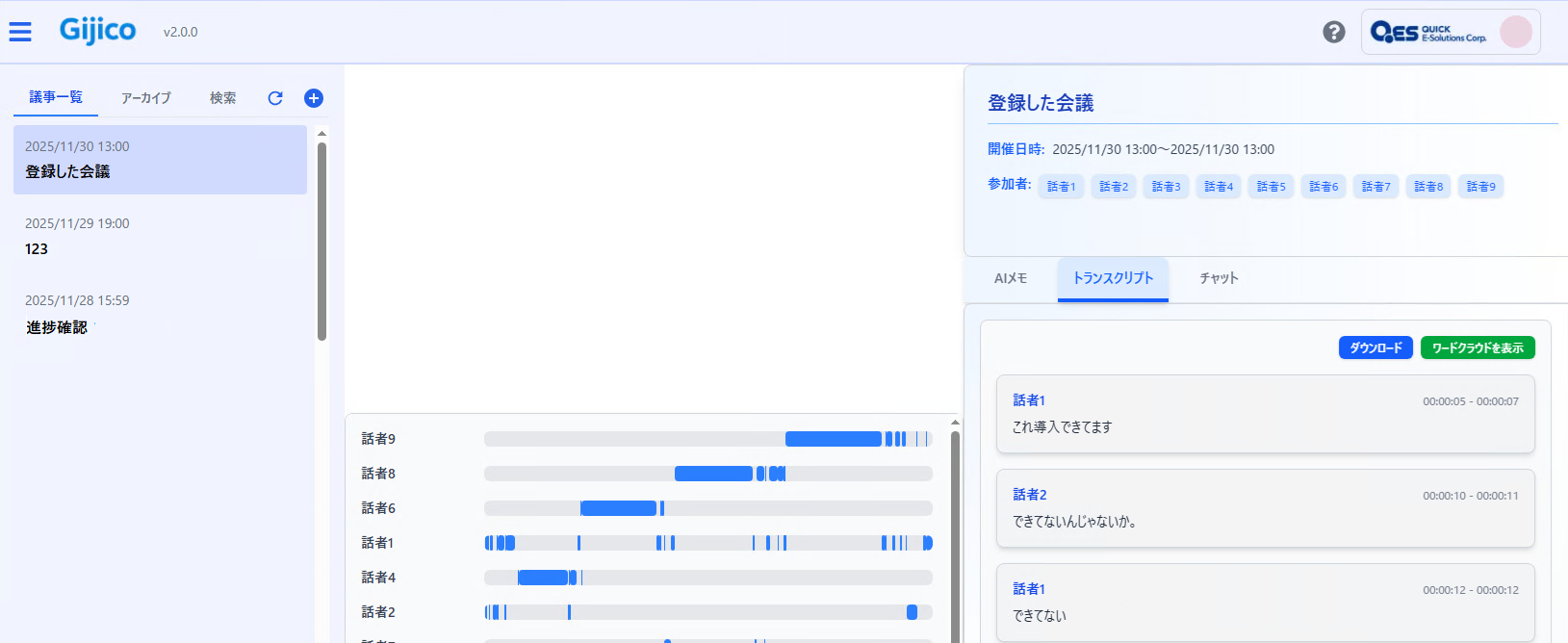
おわりに
今回は、Azure Content Understanding の RAGアナライザーを試してみました。出力されたデータは、画像、音声、動画データを含めた RAGの構成に役立ちそうです。QUICK E-Solutions では、各Azure AI サービスを利用したシステム導入のお手伝いをしております。それ以外でも様々なアプリケーションの開発・導入を行っております。提供するサービス・ソリューションにつきましては こちら に掲載しております。
システム開発・構築でお困りの問題や弊社が提供するサービス・ソリューションにご興味をお持ちになりましたら、ぜひ一度 お問い合わせ ください。
※このブログで参照されている、Microsoft、その他のマイクロソフト製品およびサービスは、米国およびその他の国におけるマイクロソフトの商標または登録商標です。
※その他の会社名、製品名は各社の登録商標または商標です。