記事公開日
【Intro to Kiro】Kiro Getting Started Part 2:Practicing Spec-Driven Development (SDD)

Key Takeaways
In this article, we explain the process of "Spec-Driven Development" using the Spec mode of the AI code editor "Kiro." This involves taking natural language ideas, refining them through requirements definition and design, and then proceeding to implementation. We verified a development flow with minimal rework and AI's high adaptability to autonomously resolve even environment-dependent errors.
- Development with minimal rework via Spec-Driven approach:
Instead of jumping straight into coding, Kiro generates three stages of documentation:requirements.md(Requirements),design.md(Design), andtasks.md(Tasks). This ensures a logical development flow with significantly less rework. - Autonomous resolution of environment-dependent errors:
During the implementation phase, when an error occurred due to thepipcommand not being found in the execution environment, Kiro autonomously proposed and executed a switch topython -m pip, completing the troubleshooting without user intervention. - Verification of external API integration tools:
We successfully acquired weather information for Chiyoda Ward (default) and Kitahiroshima City (specified via argument) using the created Python script. Furthermore, we confirmed that detailed implementation requirements, such as displaying "Low Temperature Warnings (Expected -8.0°C)," functioned correctly.
Recap: What is Kiro's Spec Mode?
This is Miura from the DX Solution Division.Continuing from our previous post, I will be taking the Getting Started course for "Kiro," the AI code editor/agent that is currently drawing a lot of attention.
In the last session, we checked Kiro's setup and basic interface. This time, we will create an actually functioning application using Kiro's standout feature, "Spec Mode."
Spec Mode is a feature where the AI leads the development process. Instead of "writing code immediately," it follows a flow of "structuring ideas into a specification document (requirements.md), converting them into a plan (design.md / tasks.md), and then implementing them."
↓ Click here for the previous blog post
1. Creating requirements.md (Requirements Definition)
Following the demo scenario, we will create a "cross-platform script that retrieves the current temperature and precipitation probability based on a zip code."
Creating the Project and Gathering Requirements
First, I communicate the overview of the tool I want to create in Kiro's Spec panel. When I say in natural language, "I want to plan a script that can be run in the terminal...", Kiro suggests a project name and generates the initial requirements.md.
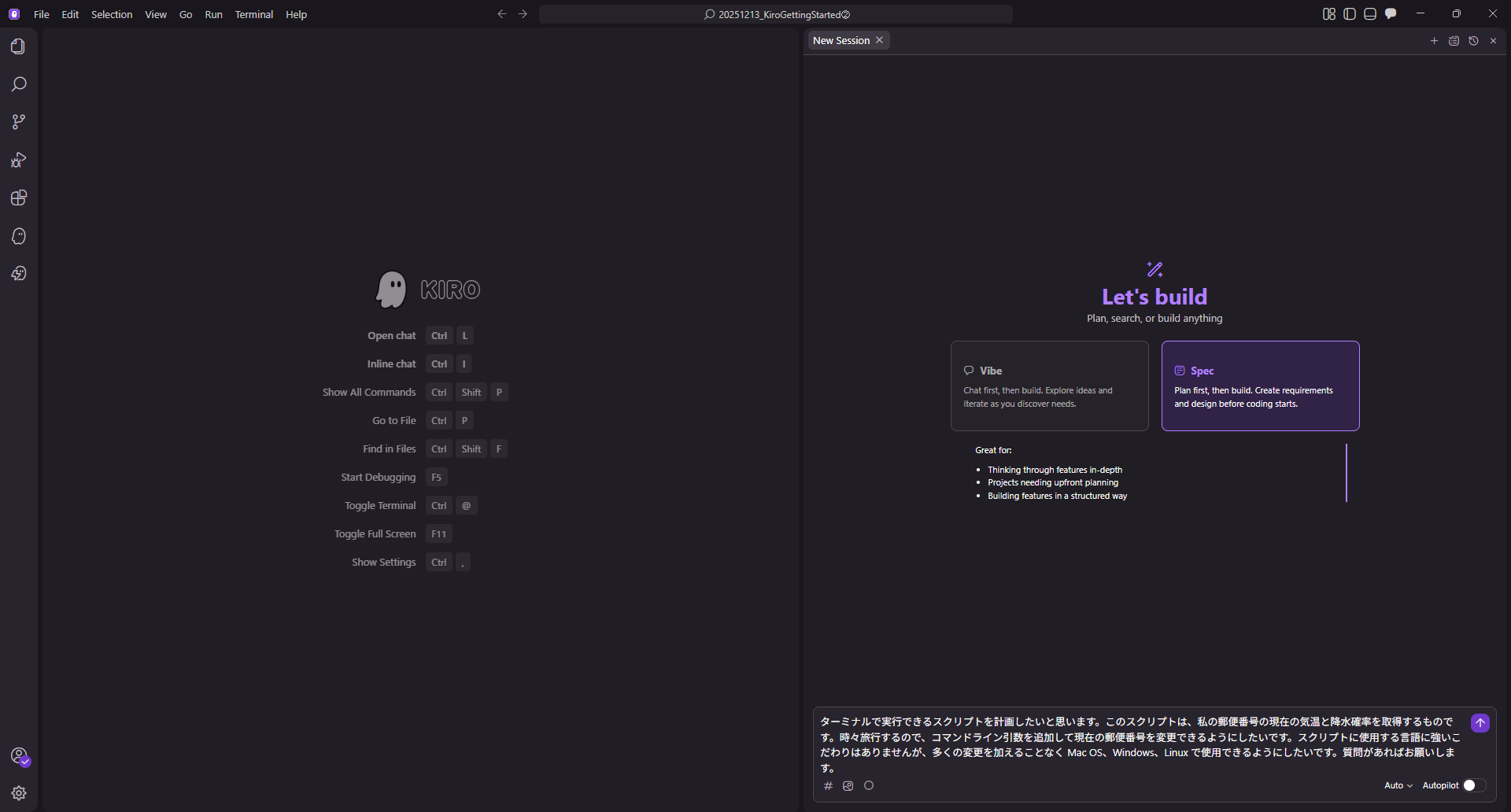
Structured documents are generated from natural language instructions.
The generated requirements.md included the following content:
Structured documents are generated from conversations in natural language.
The generated requirements.md contained:
- User Story
- Acceptance Criteria
- Key Features (Default zip code, argument specification, error handling, etc.)
Adding Specifications via Conversation
Here, I intentionally added a requirement. When I told it, "If there are any advisories (heat, cold, wind, etc.) for my area, I want to see the details," Kiro immediately updated requirements.md and added a feature to display weather warnings and advisories.
Changes are displayed as diffs, and are finalized when the user "Accepts" them.
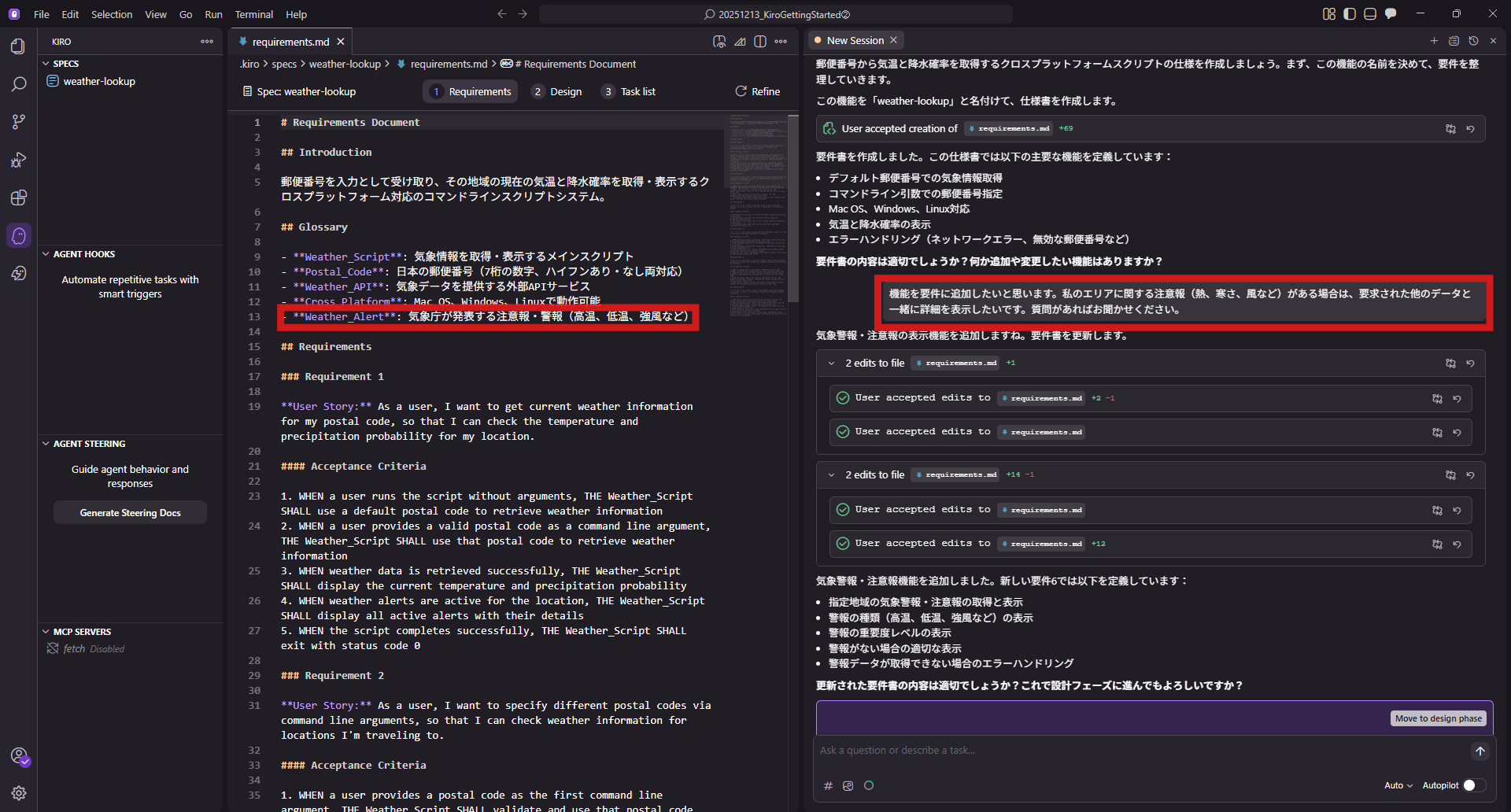
Changes are displayed as diffs, and are finalized when the user "Accepts" them.
2. design.md (Design) and tasks.md (Implementation Plan)
Once the requirements are set, we proceed to "Move to design phase." This is where Kiro is impressive; it autonomously starts a Web search to find the technical information needed for implementation.
- Investigation of Japanese Zip Code APIs
- Selection of Weather Data Acquisition APIs
- Comparison of libraries for cross-platform support
Based on these findings, design.md was generated. This time, it proposed using Python with a modular design approach.
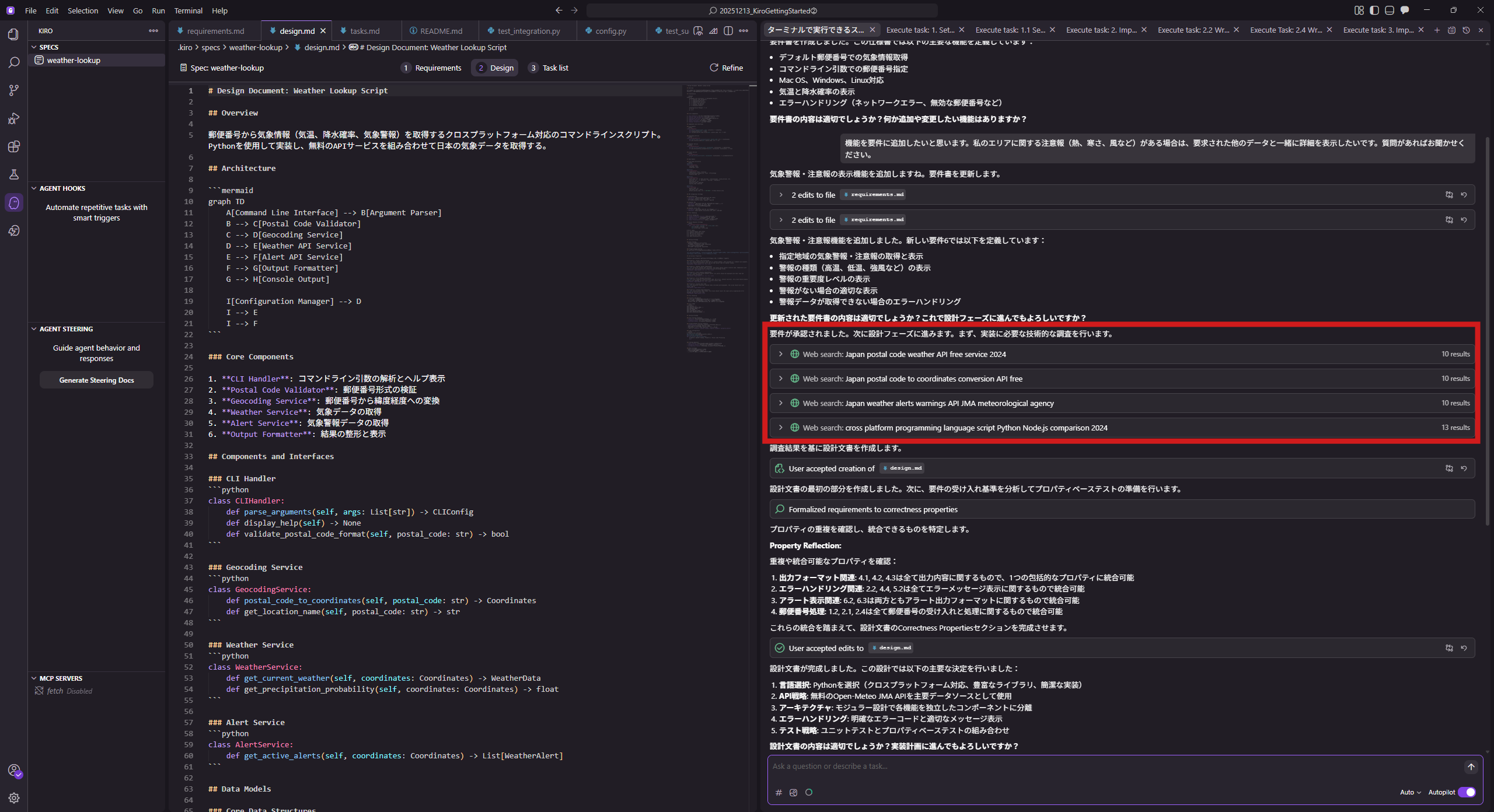
Design document (design.md) based on the investigation of necessary technical information.
Generating the Task List
After approving the design, tasks.md is generated next. The implementation process is broken down into smaller tasks, with items like "Create tests" and "Update documentation" linked to each task. I selected "Keep optional tasks" to prioritize implementing the core features.
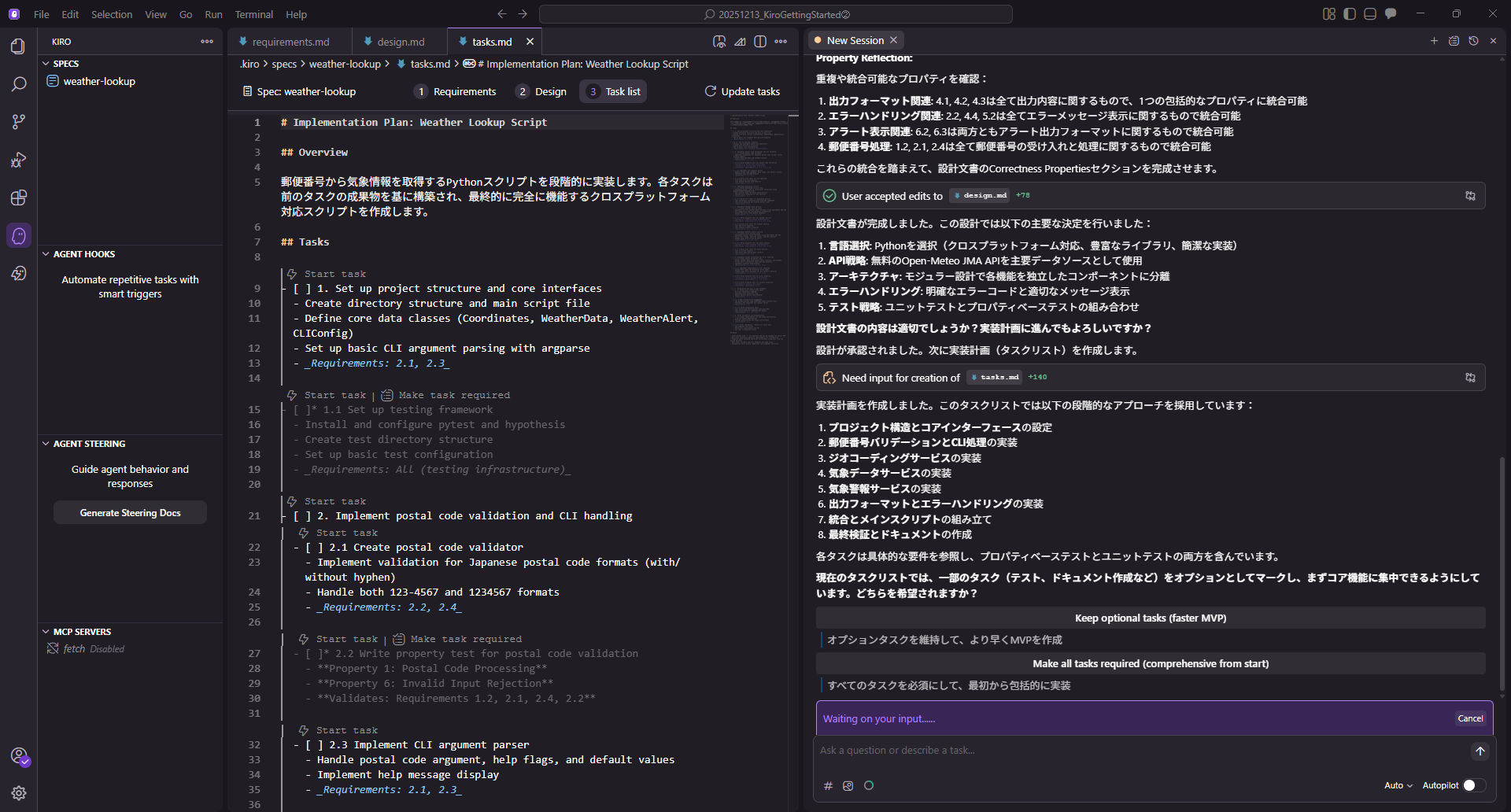
Task list (tasks.md) detailing the implementation process.
3. Autonomous Coding and Troubleshooting by Kiro
Now we enter the implementation phase. Simply by clicking "Start task" according to the list in tasks.md, Kiro begins coding.
What is noteworthy here is its ability to handle errors.
Automatic Resolution of Environment-Dependent Errors
During a task, when it tried to install a library, an error occurred because the path to the pip command was not set in my environment. However, before I could investigate the cause, Kiro autonomously proposed an alternative solution.
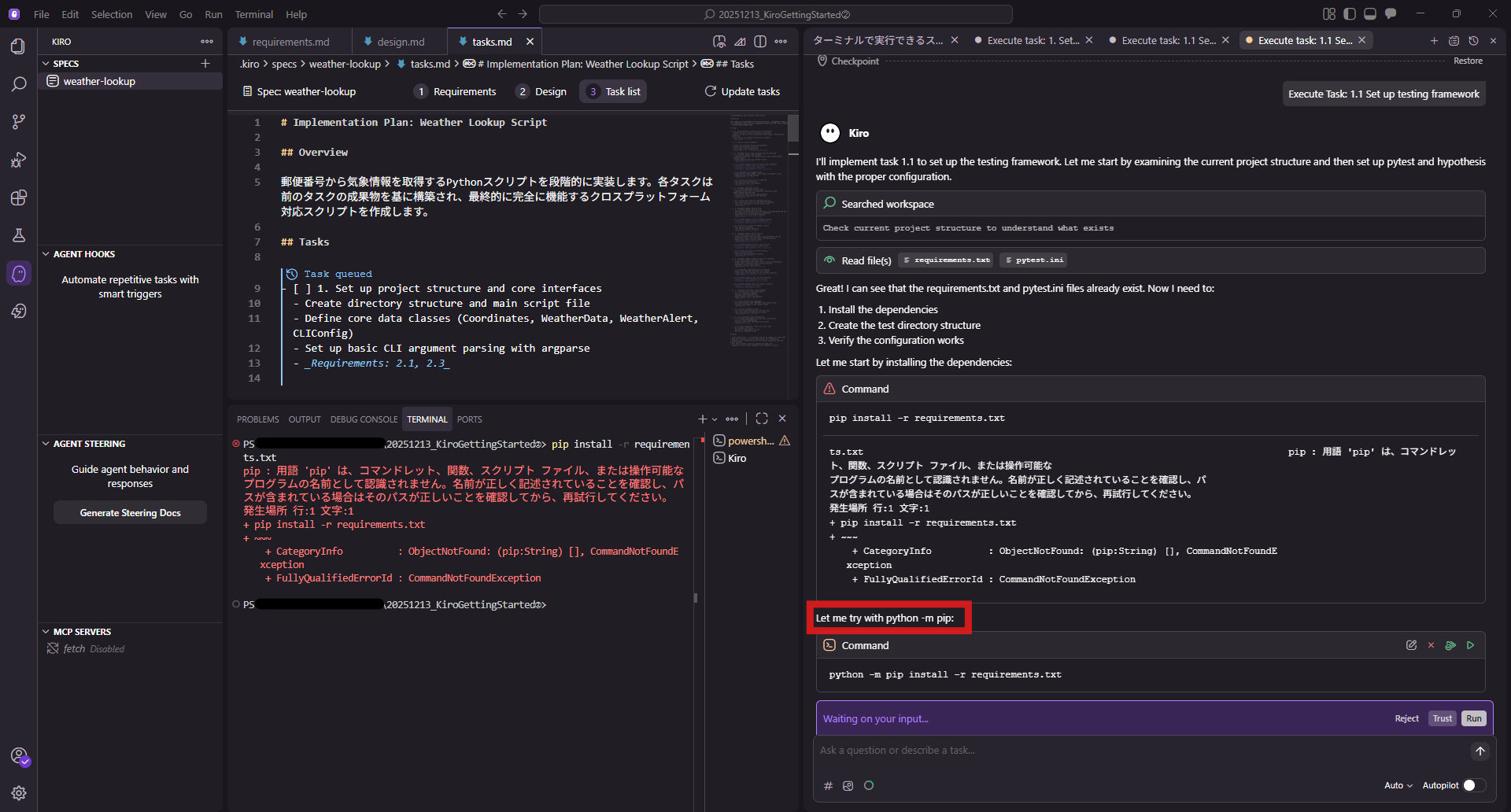
The user only needs to "Trust" or "Accept" the proposed solution.
The user only needs to "Trust" or "Accept" the proposed solution.
In this way, the AI handles not just writing code, but also the loop of "Troubleshoot" -> "Re-run" for execution environment errors. I basically just had to keep pressing the approval button (Accept command), and the tasks became "Completed" one after another.
4. Verifying the Completed CLI Tool
All tasks were completed, and tests passed. README.md was also automatically generated.
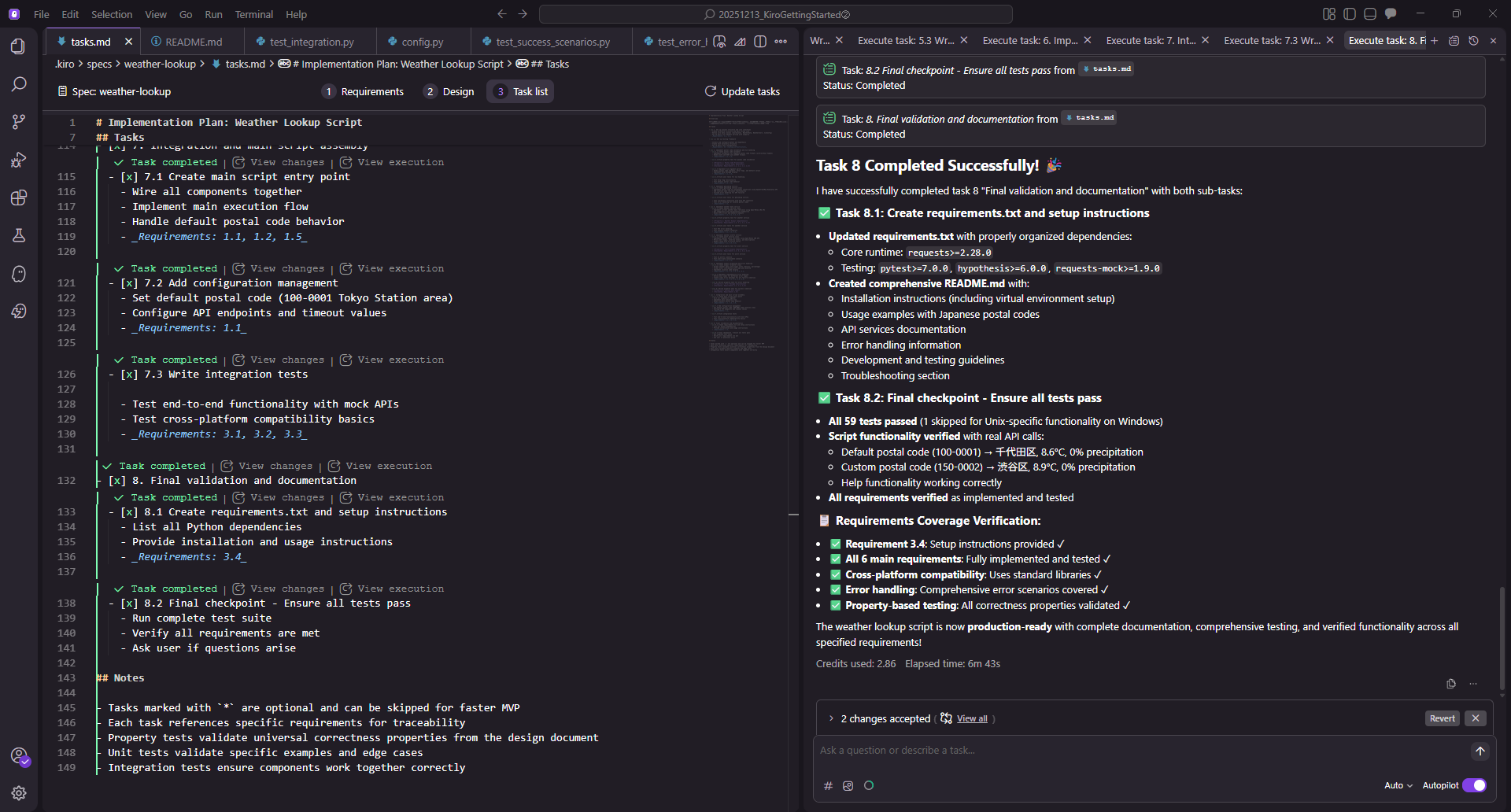
Screen after all tasks are completed. Tests passed, and README is generated.
Let's try running the created tool weather_lookup.py on Kiro's Terminal.
Default Execution (Chiyoda Ward)
Running it without arguments displayed the weather for Chiyoda Ward, which is the default setting.
Location:  Chiyoda-ku
Temperature: 8.1°C
Precipitation Probability: 0%

No active weather alerts.
Specifying Zip Code (Kitahiroshima City)
Next, let's specify a zip code (near Es Con Field) as an argument.
> python weather_lookup.py 061-1112

Location:  Kitahiroshima-shi
Temperature: -2.7°C
Precipitation Probability: 0%

Weather Alerts:
- Cold Warning (Advisory)
Description: Freezing temperature advisory: -8.0°C expected
Effective: 2025-12-26 06:55
Expires: 2025-12-26 23:59
It successfully retrieved the weather for the specified location, and the "Cold Warning," which was added as an additional requirement, is also displayed.
Summary: The Benefits of Spec-Driven Development
Through the Kiro Getting Started demo, we went from specification (Spec) to implementation in one seamless process.
My impression is simply "minimal rework." Because requirements are solidified in requirements.md and the structure is decided in design.md before coding begins, we avoid the common AI phenomenon of "it works but the internals are a mess" or "it breaks when you try to fix it." I felt that the sensation of moving straight to completion without deviating from the goal is a unique strength of Kiro.
On the other hand, since most of the process is automated, whether the user can give clear instructions visualizing the deliverable at the initial Requirements Definition (Spec) stage determines the quality. If we master advanced features like Powers, Steering, and Hooks, we could likely streamline even more complex developments.
At QES, we also verify and support the introduction of these latest AI development tools. If you are interested, please feel free to contact us.
We aim to become Japan's #1 resource for Kiro! Our mission is to evangelize this technology by empowering end-users with top-tier education and technical support.
If you have any requests such as "I want to know about this service" or "AWS environment construction/migration," please feel free to contact us via our Contact Form. For inquiries regarding complex matters, our sales team will contact you directly. Also, please check out the links below!
<QES Related Solutions / Blogs>
<The AWS Security Promotion Consortium, in which QES participates, has released a white paper>
※Amazon Web Services, the "Powered by Amazon Web Services" logo, and other AWS trademarks used in this blog are trademarks of Amazon.com, Inc. or its affiliates in the United States and other countries.