記事公開日
【Kiro Efficiency】Preventing rework with Steering

Key Takeaways
We will explain specific methods to prevent unintended code modifications and rework by AI by defining development rules using the "Agent Steering" feature of the autonomous AI agent "Kiro."
- Standardizing Development Rules with Agent Steering:
We introduce a mechanism to guarantee quality and consistency in AI development by unifying coding conventions and behaviors across projects using Global settings. - Mandating the "Proposal Presentation" Process:
Instead of letting the AI modify code immediately, we establish a workflow to prevent AI from going rogue by describing rules that force a proposal of changes and user approval beforehand. - Practical Verification Using a Calculator Program:
Taking a modification task for a Python-based app as an example, we compare the impact of Steering settings on Kiro's behavior and demonstrate that excessive feature additions can be suppressed.
Hi there! I'm Kikuchi from the DX Solution Sales Division.
When giving modification instructions while using Kiro, have you ever experienced rework because it edited unintended parts?
This time, I'll introduce how to use the Agent Steering feature to put a "cushion" in Kiro's modification process and prevent rework.
For an overview of Kiro, please check the blog post below.
What is Steering?
Agent Steering is a feature that allows you to define guidelines for Kiro's behavior and responses.
By using this, you can make Kiro comply with project-specific rules or company-wide coding conventions.
For an overview of Steering, please refer to the official documentation below.

Setup Procedures
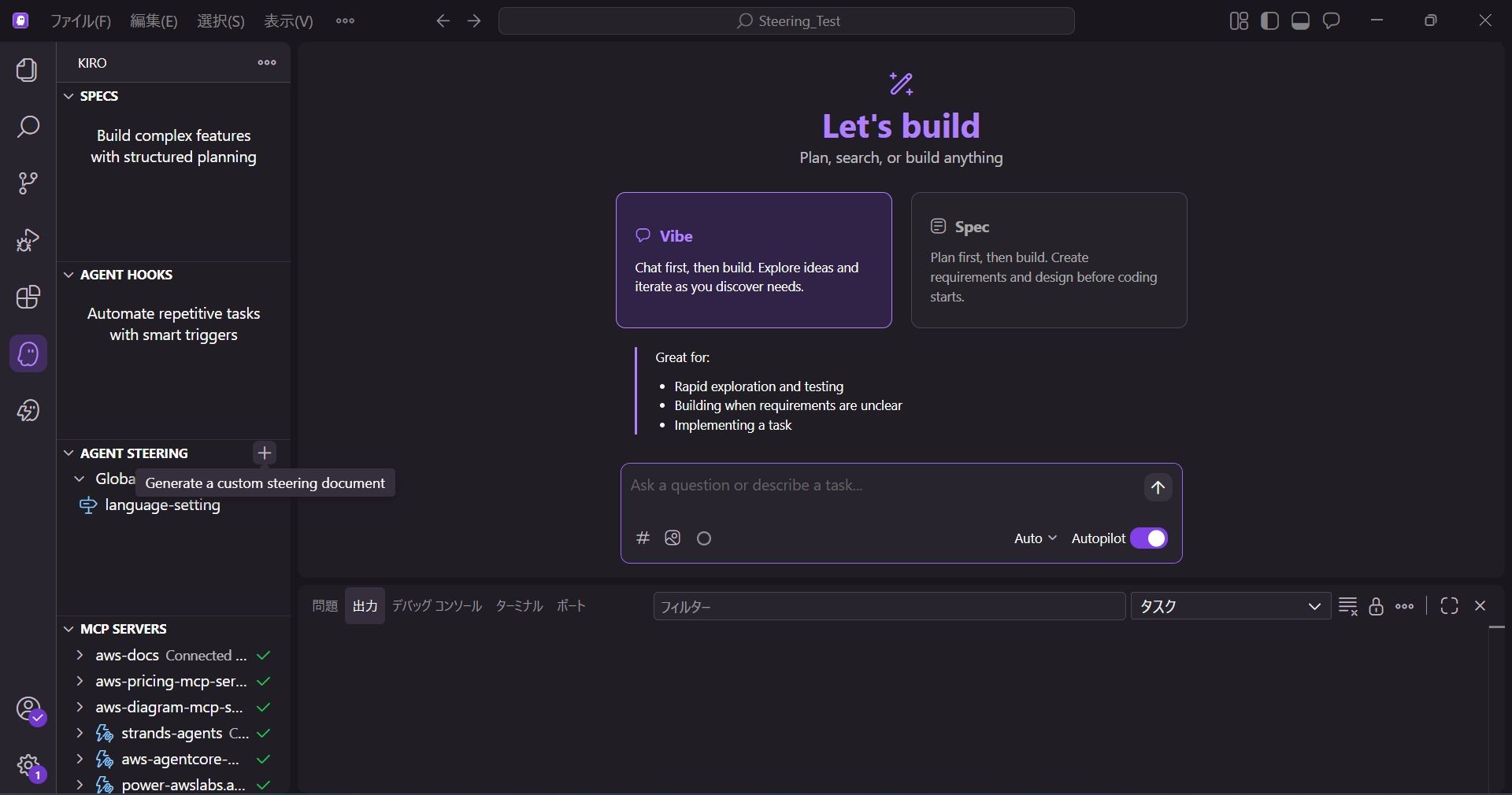
1. Creating a Steering File
Select the + next to AGENT STEERING.
2. Setting Scope and Name
When creating a Steering file, first select the scope of the Steering file.
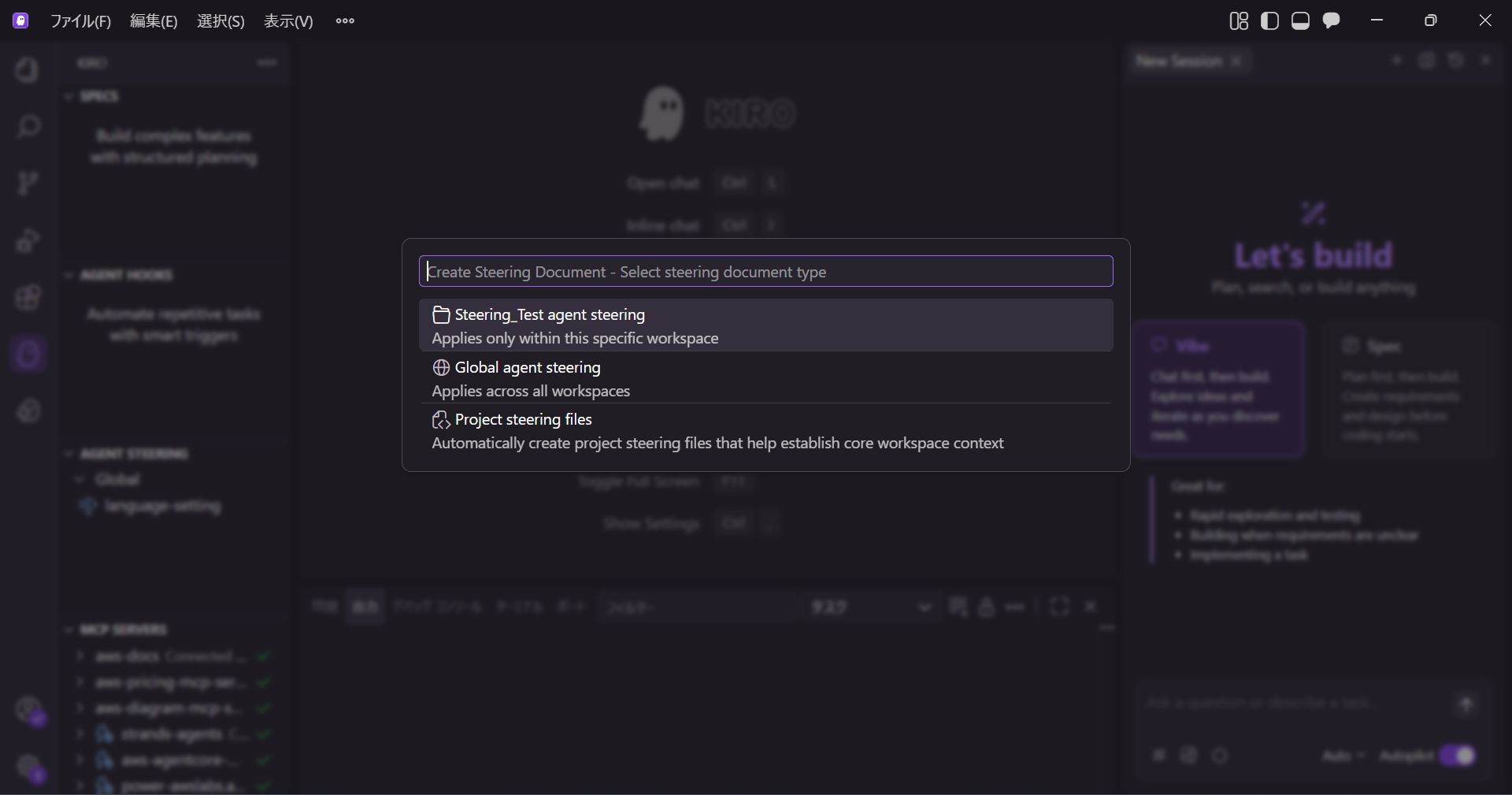
- Workspace
Applied only to the current working directory. - Global
Applied whenever you use Kiro.
This time, since we want to prevent rework whenever using Kiro, we select Global.
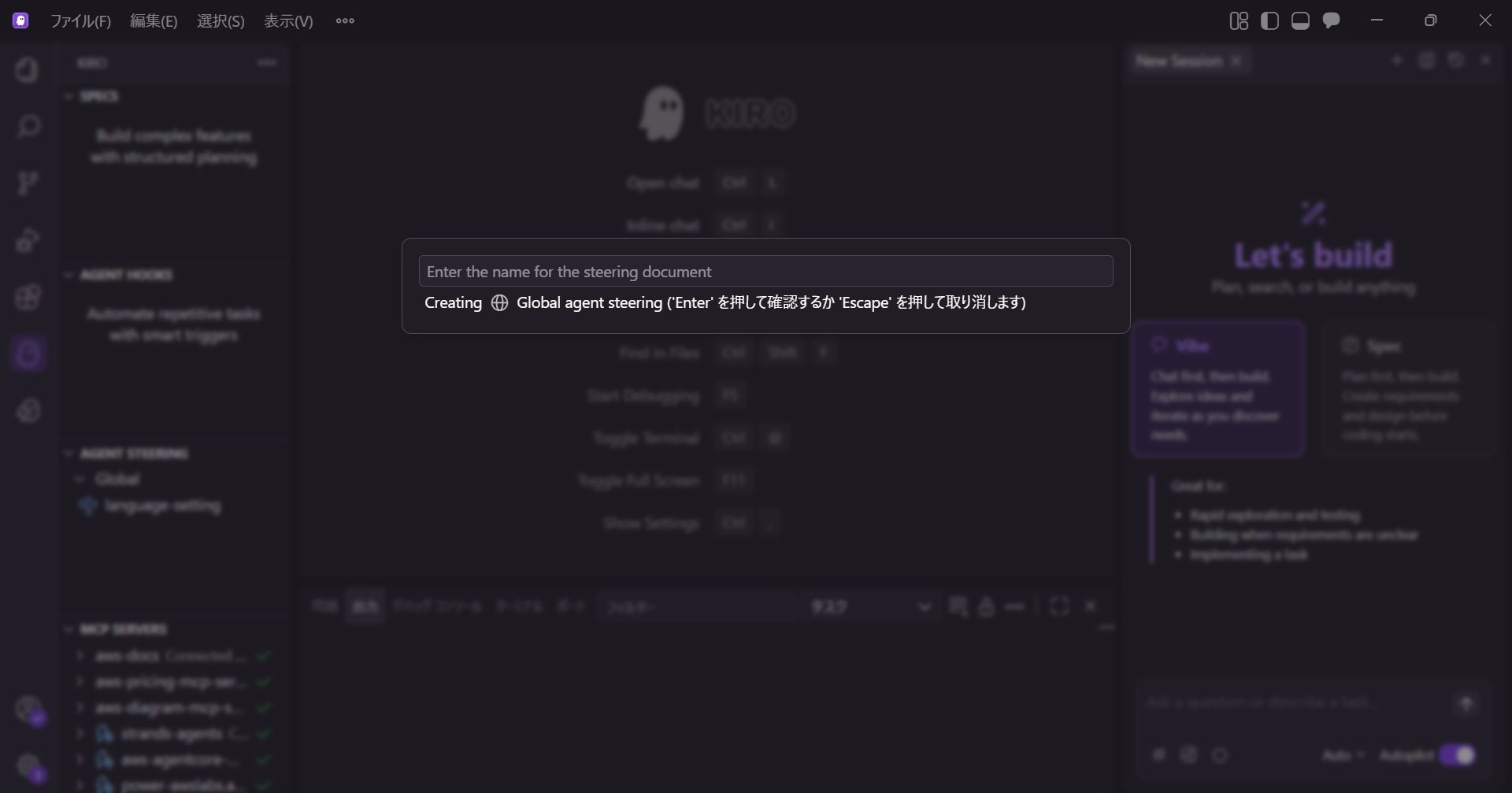
Next, set the name of the Steering file.
We named it preventing-rework this time.
3. Editing the Steering File
Delete the comment section in the generated file.
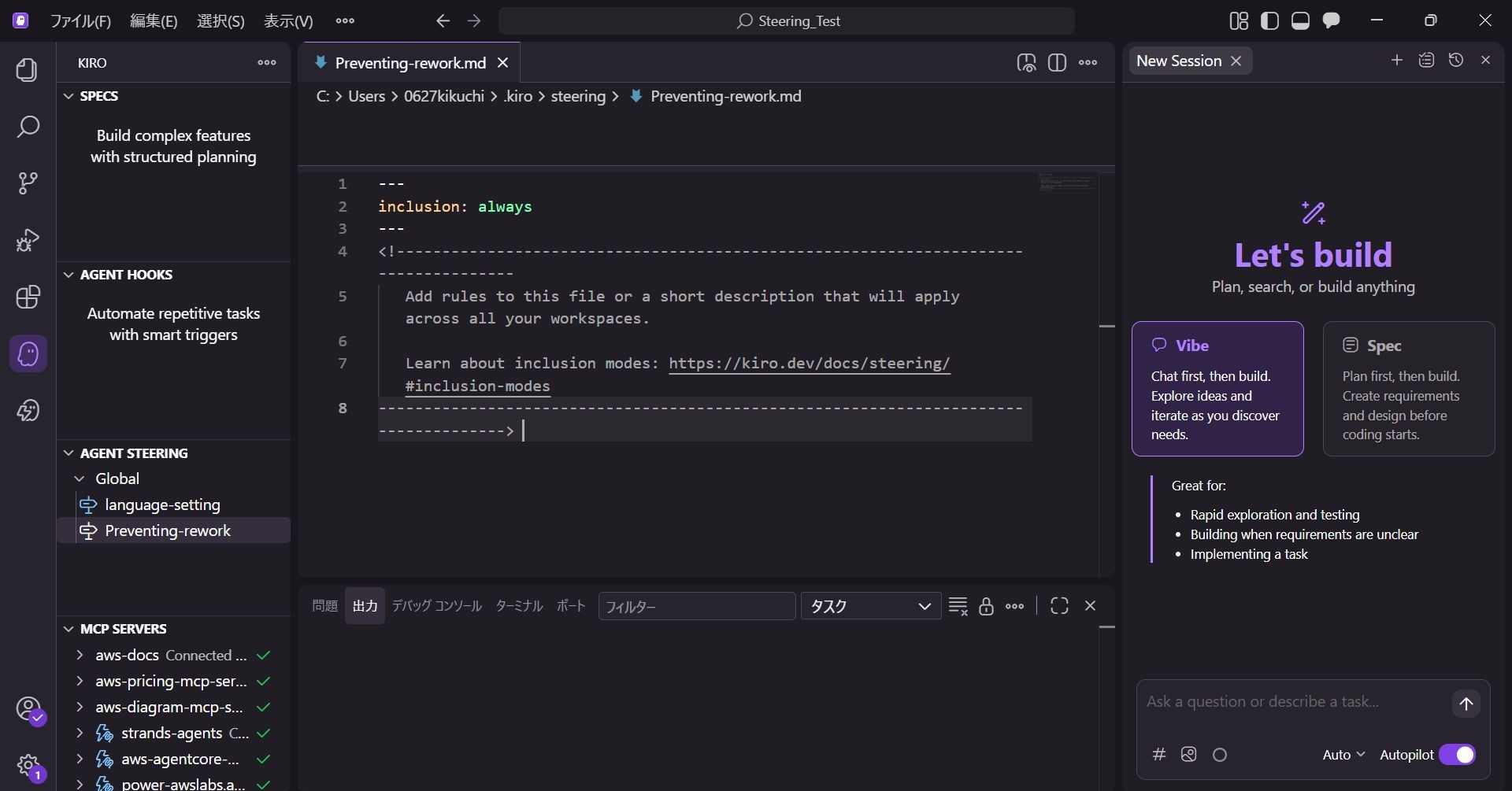
Describe the content you want to set.
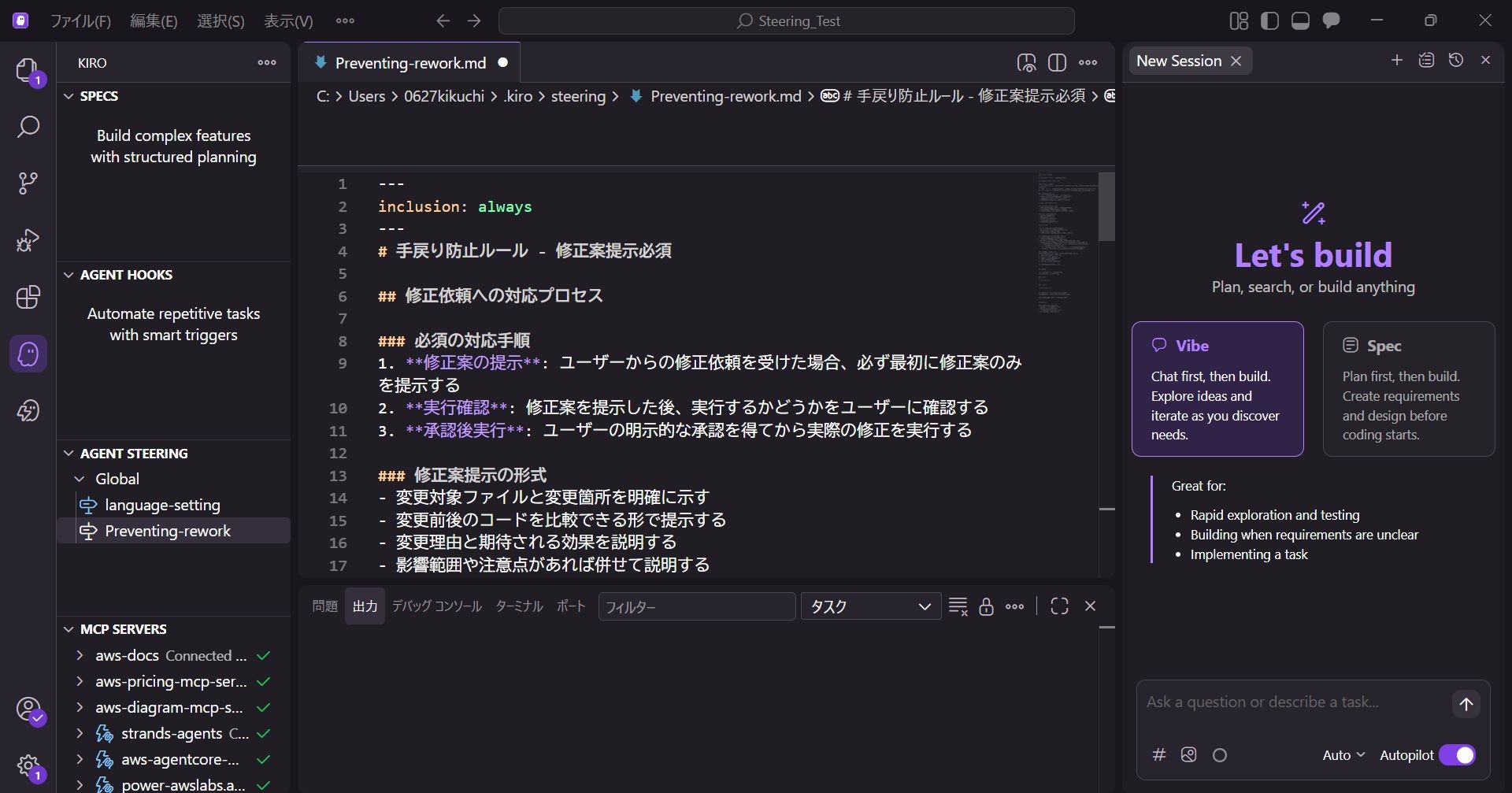
This time, we will set it up so that it presents the code before and after modification and then asks the user if it's okay to proceed.
The settings are as follows:
# Rework Prevention Rule - Proposal Mandatory

## Process for Handling Modification Requests

### Mandatory Steps
1. **Present Proposal**: When receiving a modification request from a user, always present only the proposal first.
2. **Execution Confirmation**: After presenting the proposal, confirm with the user whether to execute it.
3. **Execute After Approval**: Perform the actual modification only after obtaining explicit approval from the user.

### Proposal Format
- Clearly indicate the target file and the parts to be changed.
- Present it in a way that the code before and after the change can be compared.
- Explain the reason for the change and the expected effects.
- Explain the scope of impact or points to note, if any.

## Mandatory Items for Pre-execution Confirmation

### Confirmation Content for the User
- "Is it okay to execute with this proposal?"
- "Are there any other points to consider?"
- "Please check if there are any issues with the modification content."

### Cases Requiring Confirmation
- Creating new files
- Modifying existing files
- Deleting or moving files
- Modifying configuration files
- Changes affecting dependencies

## Prohibitions

### Operations That Must Not Be Executed Immediately
- Modifying files without user approval
- Executing directly without presenting a proposal
- Executing multiple changes at once (step-by-step execution is recommended)

### Exceptional Cases (Direct Execution Allowed)
- Simple information provision or explanation only
- Reading or checking files only
- When the user explicitly instructs to "execute immediately"
- In the case of clear and specific modification instructions (only if the following conditions are met):
  - Specific action instructions like "Do ~", "Change to ~", "Add ~"
  - Target file and change content are clear
  - Single clear change (if multiple changes are included, present a proposal)
  - Low-risk changes (excluding configuration changes or major logic changes)

## Quality Assurance
- Pre-check for syntax errors
- Evaluate impact on existing features
- Consider if there are better alternatives
The Steering setup is now complete, and Kiro will load the Steering file at the start of the next chat session.
Operation Check
This time, I asked for a modification to a simple calculator program that runs on the command prompt.
The calculator source code is as follows and supports basic arithmetic operations.
#!/usr/bin/env python3
# -*- coding: utf-8 -*-
"""
Simple Calculator Program
Supports basic arithmetic (+, -, *, /)
"""

def calculate(expression):
    """
    Evaluates the expression and returns the result
    """
    try:
        # Check only allowed characters for safe evaluation
        allowed_chars = set('0123456789+-*/.() ')
        if not all(c in allowed_chars for c in expression):
            return "Error: Contains invalid characters"

        # Check for empty expression
        if not expression.strip():
            return "Error: Please enter an expression"

        # Execute calculation
        result = eval(expression)
        return result

    except ZeroDivisionError:
        return "Error: Cannot divide by zero"
    except SyntaxError:
        return "Error: Invalid expression"
    except Exception as e:
        return f"Error: {str(e)}"

def main():
    """
    Main function - Calculator main loop
    """
    print("=" * 50)
    print("        Simple Calculator Program")
    print("=" * 50)
    print("Usage:")
    print("  - Basic operations: +, -, *, /")
    print("  - Parentheses can be used: ()")
    print("  - Type 'quit' or 'exit' to finish")
    print("=" * 50)

    while True:
        try:
            # Get user input
            expression = input("\nPlease enter calculation: ").strip()

            # Check for exit command
            if expression.lower() in ['quit', 'exit', 'q']:
                print("Exiting calculator.")
                break

            # Execute calculation
            result = calculate(expression)
            print(f"Result: {result}")

        except KeyboardInterrupt:
            print("\n\nExiting calculator.")
            break
        except EOFError:
            print("\nExiting calculator.")
            break

if __name__ == "__main__":
    main()
I requested the following modification for this program:
"I want to be able to see past calculation results."
Then, Kiro understands the content of the Steering file and returns a proposal to the user.
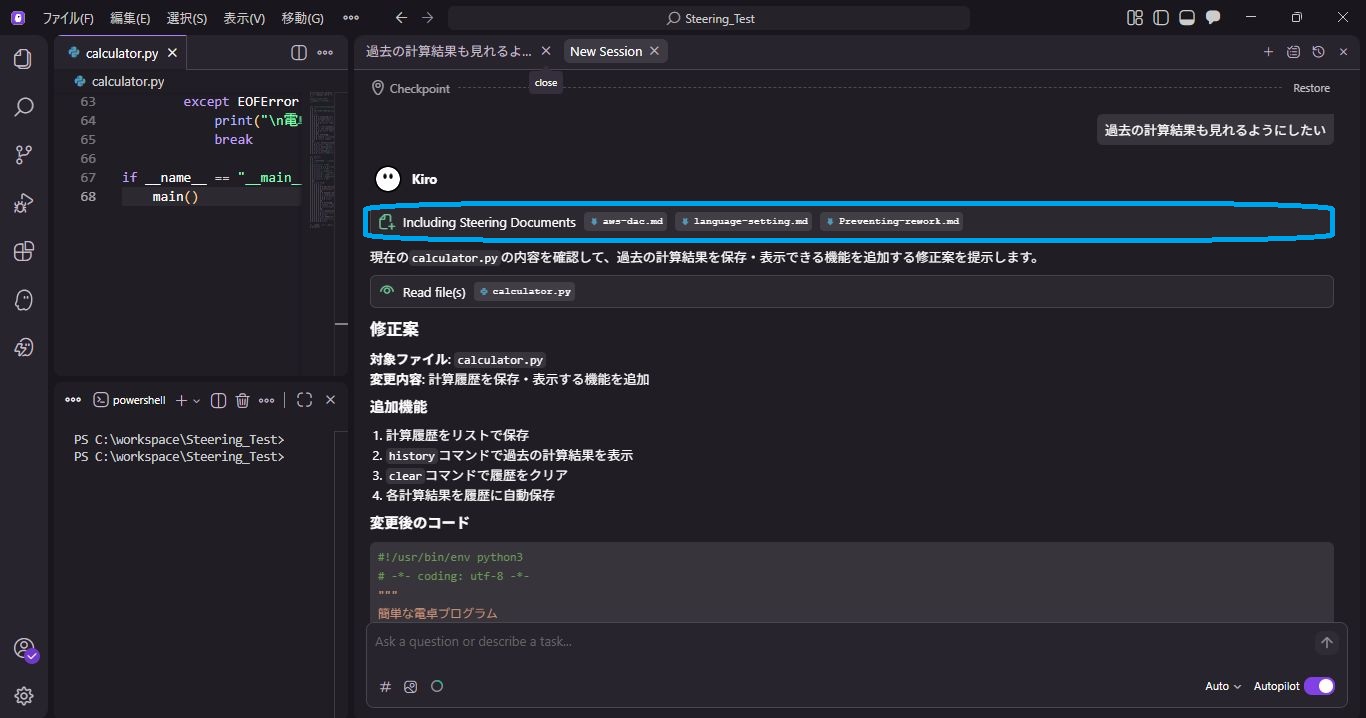
In accordance with the Steering document, it returned four additional features as a proposal.
Since I only need to see the history this time, I ask to implement only 1, 2, and 4.
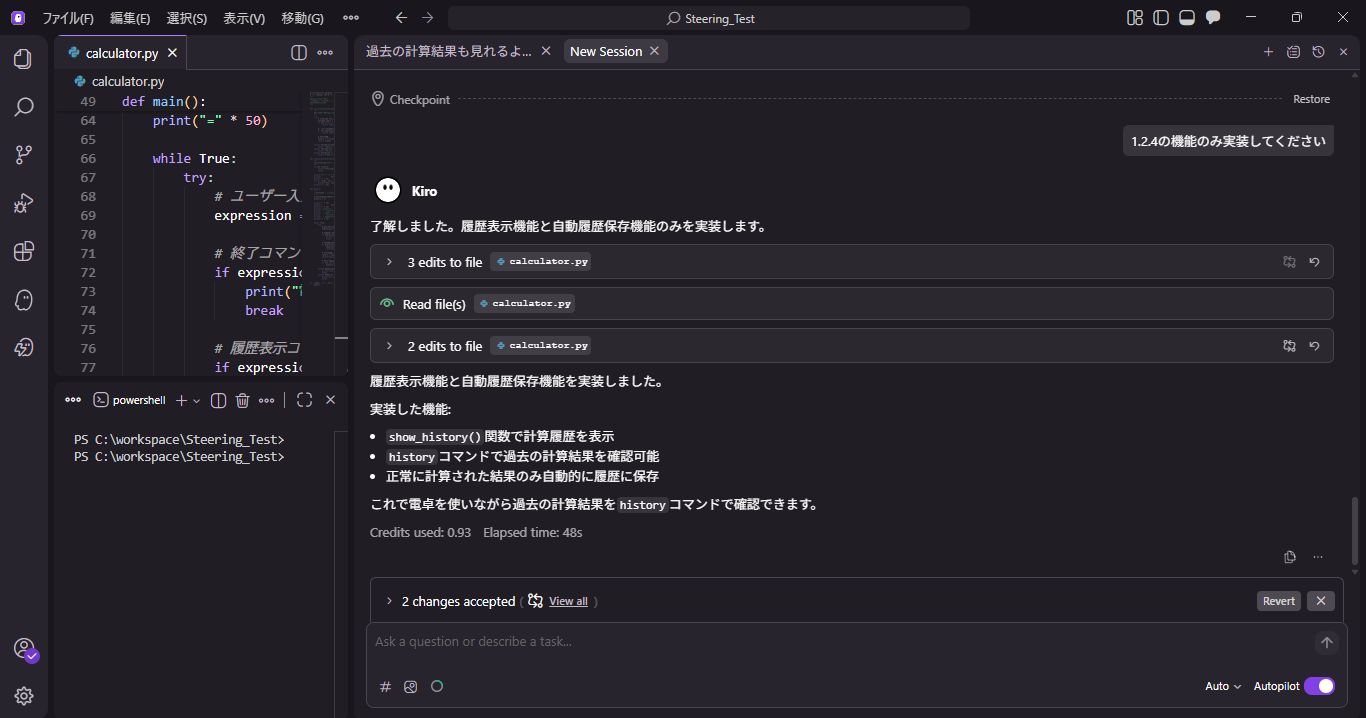
It seems it implemented only proposals 1, 2, and 4 as requested, so let's actually check it.
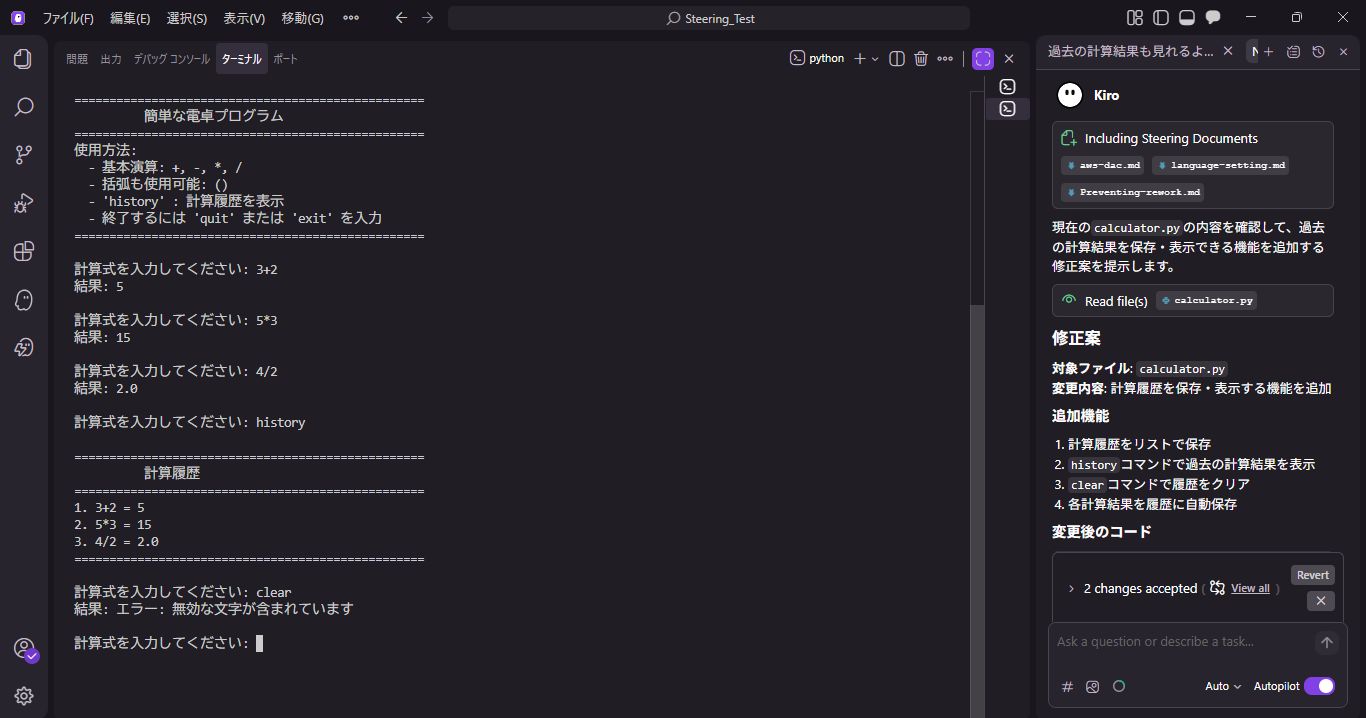
By typing the history command, I was able to check the history.
Also, the unnecessary clear command was not implemented, and excessive modification was successfully prevented.
Summary
In this post, I introduced how to prevent rework using Agent Steering.
By using Steering to put a "cushion" in modifications, you can prevent excessive editing by AI.
By using Steering, you can grow Kiro into your preferred behavior without being bound by default actions.
Development styles vary from person to person.
I hope everyone sets up their own preferred Steering files and enjoys a comfortable AI development life!
QES will continue to actively share information about Kiro, so please stay tuned!
** We aim to become Japan's #1 resource for Kiro! Our mission is to evangelize this technology by empowering end-users with top-tier education and technical support. **
If you have requests such as "I want to know about this service" or "AWS environment construction/migration," please feel free to contact us via our Inquiry Form. For inquiries regarding complex content, our sales representative will contact you directly. Also, please take a look at the links below if you like!
<QES Related Solutions/Blogs>
<The AWS Security Promotion Consortium, in which QES participates, has released a white paper>
*Amazon Web Services, the "Powered by Amazon Web Services" logo, and other AWS trademarks used in the blog are trademarks of Amazon.com, Inc. or its affiliates in the United States and other countries.