記事公開日
Trying Out Kiro's New Web Search Feature: Real-time Information Retrieval in Action

Key Points of This Article
I personally tested the new Web Search feature added to the Kiro CLI. This post verifies its real-time information retrieval capabilities using the evolution of Amazon QuickSight into "Amazon Quick Suite" as an example.
- Web Search Overview: Starting from Kiro CLI v1.21.0, it is now possible to retrieve the latest information from the internet in real-time.
- Practical Use Case: Witnessing Kiro autonomously perform web searches to fetch the latest details on Amazon Quick Suite.
- Improved Development Efficiency: Access the latest information directly within your development workflow without switching to a browser.
- Smart Information Gathering: Confirming Kiro's ability to understand context and automatically trigger web searches as needed.

Introduction: What is Kiro's Web Search Feature?
Hello. This is Matsuura from the DX Solution Sales Division.
Starting with Kiro CLI v1.21.0 (released November 25, 2025), a feature allowing Kiro CLI to retrieve real-time information from the internet has been added. This allows you to search for the latest library versions, documentation, and solutions to technical issues directly within your development workflow without having to switch to a browser.
This time, I tested this feature by attempting to retrieve the latest information on the evolution from Amazon QuickSight to Amazon Quick Suite.
Reference - Official Announcement Content
According to the official AWS blog, it is described as follows:
Web Search & Fetch Capability
Kiro CLI can now retrieve information from the internet in real-time. You can search for the latest library versions, documentation, and technical troubleshooting tips directly within your dev workflow.
Primary Use Cases
- Referencing latest library documentation
- Searching for technical issue resolutions
- Checking the latest API specifications
Source: Kiro CLI Feature Summary: v1.21.0 to v1.23.0 (AWS Official Blog)
The Kiro CLI changelog also states:
"We've added new web search and fetch capabilities to the Kiro CLI, enabling access to current information from the internet in real-time."
1. Putting it to the Test
Information Used for Verification
On October 9, 2025, AWS rebranded Amazon QuickSight as "Amazon Quick Suite," evolving it from a traditional BI service into a comprehensive analytical platform powered by generative AI. I will use this latest update to verify Kiro's web search capabilities.
Test 1: Asking a question without Web Search (MCP enabled)
First, I asked a simple question: "Please tell me about Amazon Quick Suite."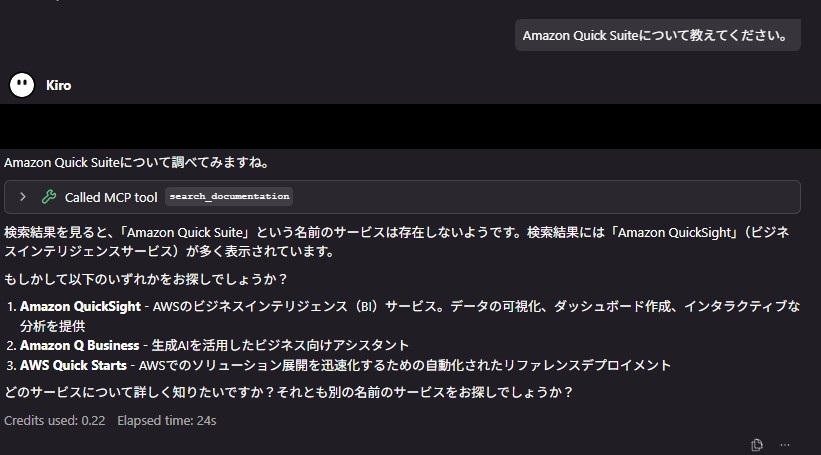
As a result, Kiro determined that a service named "Amazon Quick Suite" did not exist and instead suggested known services like "Amazon QuickSight" or "Amazon Q Business." This happened because the information was newer than Kiro's training data/MCP updates, and web search was not triggered.
Test 2: Adding context to the result of Test 1
Next, I followed up by providing context: "I believe Amazon QuickSight became Quick Suite due to an update."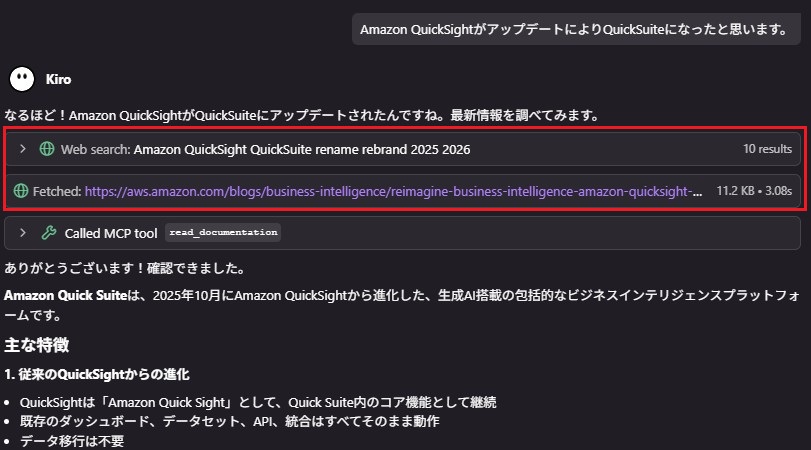
Kiro then demonstrated the following behaviors:
- Autonomous Judgment: Even without being explicitly told to "Search the web," Kiro determined from the context that latest information was required.
- Executing Web Search: It automatically performed a search with keywords like "Amazon QuickSight QuickSuite rename rebrand."
- Information Gathering & Organization: It retrieved the latest info from official AWS blogs and documentation, presenting it in a structured format.
- Deep Dive: Deciding that more detail was needed, it also fetched content from specific official documentation pages.
Test 3: Specifying Web Search from the start
Finally, in a new chat session, I asked: "Using web search, please tell me about Amazon Quick Suite."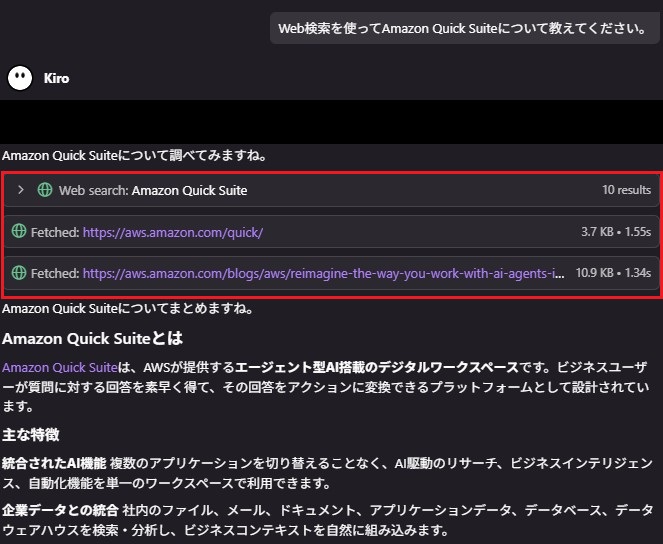
In this case, Kiro used the web search feature from the very first response to gather information and provide an answer.
Verification Results
From these three tests, I found the following characteristics of Kiro's web search feature:
- Test 1 Result: For simple questions, Kiro relies on its training data without using web search. Even if latest info is needed, the search won't trigger if the necessity isn't clear from the prompt.
- Test 2 Result: By adding context, Kiro autonomously judges that "latest info is needed" and utilizes web search. It executes search appropriately based on the conversation flow even without explicit instructions.
- Test 3 Result: Explicitly instructing it to "Use web search" ensures the feature is activated. This is the most reliable method when you know you need the latest data.
These results confirm that while Kiro possesses strong contextual understanding, explicit instructions are effective when certainty is required.
2. Personal Impressions
The "Intelligence" of the Web Search Feature
I found it very convenient that Kiro understands context and autonomously executes web searches. Rather than needing a rigid "Search for X" command, it realizes "this information needs to be up-to-date" from the flow of conversation and searches at the right timing.
Kiro prioritized reliable sources like official documentation and AWS blogs. Furthermore, the retrieved information always included source URLs, which is great for source verification.
Concerns
On the other hand, if a simple question is asked without any context, Kiro may answer from its training data without triggering a search. This behavior carries the risk of proceeding with a project based on outdated information if the user lacks foundational knowledge.
As a countermeasure, when working on themes where your own knowledge is limited, it's effective to explicitly specify web search in your prompt. Using Steering to force the web search feature is also a valid option.
Impact on Development Efficiency
I felt that the web search feature provides the following efficiency gains compared to traditional methods:
| Traditional Method | Kiro Web Search |
|---|---|
| Open browser → Search → Check multiple pages → Organize info → Return to IDE | Ask Kiro → Automatically retrieve organized/searched info |
| Approx. 5–10 minutes | Approx. 1–2 minutes |
| Context switching occurs | Completed within the dev environment |
Ideal Use Cases
This feature is particularly effective in scenarios such as:
- Checking latest library/framework info: Version updates or breaking changes.
- Searching for error message solutions: Latest bug fixes or workarounds.
- AWS service update info: Catching new features or pricing changes.
- Investigating tech trends: Gathering info on new technologies and best practices.
Summary: Web Search for Higher Efficiency
Kiro CLI's web search feature is not just a search tool; it functions as a smart assistant that understands context and autonomously retrieves information. In this test, it automatically searched, retrieved, and organized latest info on the evolution of Amazon QuickSight into Quick Suite without explicit instructions.
This feature eliminates the need for developers to bounce between a browser and their IDE, allowing access to the latest information without interrupting the development flow. It is exceptionally useful when working with services like AWS that are updated frequently.
However, since the search triggers based on context unless explicitly instructed, users should be mindful to explicitly request a web search in their prompt when they want to guarantee the most current data.
If you are already using Kiro, please take advantage of this web search feature and experience the boost in development efficiency for yourself!
↓QES will continue to actively share information about Kiro, so please check them out!
** We aim to become Japan's #1 resource for Kiro! Our mission is to evangelize this technology by empowering end-users with top-tier education and technical support. **
If you have requests like "I want to know more about this service" or need help with "AWS environment construction/migration," please feel free to contact us via our inquiry form. For complex inquiries, our sales representative will contact you directly. Also, please check out the following links!
<QES Related Solutions/Blogs>
<The AWS Security Promotion Consortium, in which QES participates, has released a white paper>
*Amazon Web Services, the "Powered by Amazon Web Services" logo, and other AWS trademarks used in the blog are trademarks of Amazon.com, Inc. or its affiliates in the United States and other countries.