記事公開日
最終更新日
Bing Web Search API と AI Search を使って CRAG の構成を試してみた ①

生成AI を仕事などで利用している人が増えてきているかと思います。弊社でも、「LLM:大規模言語モデル」を拡張する 検索拡張「RAG:Retrieval Augmented Generation」を構築することも増えてきました。
LLM だけでは AIが幻覚(Hallucination)を見ているかのようなもっともらしい嘘を出力することが多々あります。その一つの対策として LLM を拡張する意味で、RAG が利用されるようになりました。
ただ、実際に RAG を使用してみても、どうしても信頼性が低い回答が生成されてしまいます。
そこで、最近その対策として Corrective Retrieval Augmented Generation(CRAG)がGoogle の研究者から提唱されました。
本記事では、最新情報を補完する目的で利用する Bing Web Search API を使用し、Azure OpenAI 、Azure Search の構成で CRAG の仕組みを構築していきたいと思います。
今回は手始めに、C#でBing Web Search API を実行してみたいと思います。
Bing Web Search の構築
Bing Web Search API を利用するために、Bing リソースを構築していきたいと思います。
まずは、「Bing リソース」の追加から、「Bing Search」を選択します。
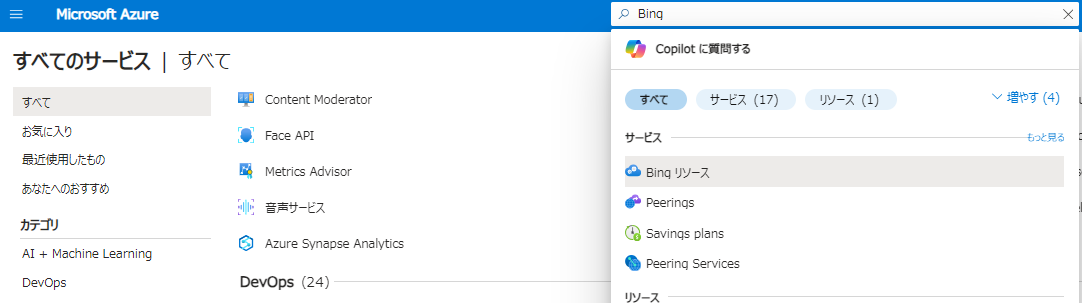
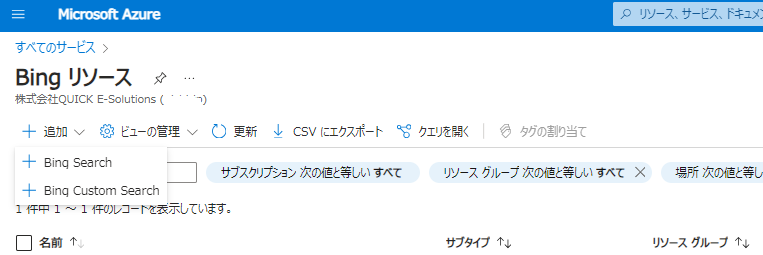
とりあえず、価格レベル「F1」で作成します。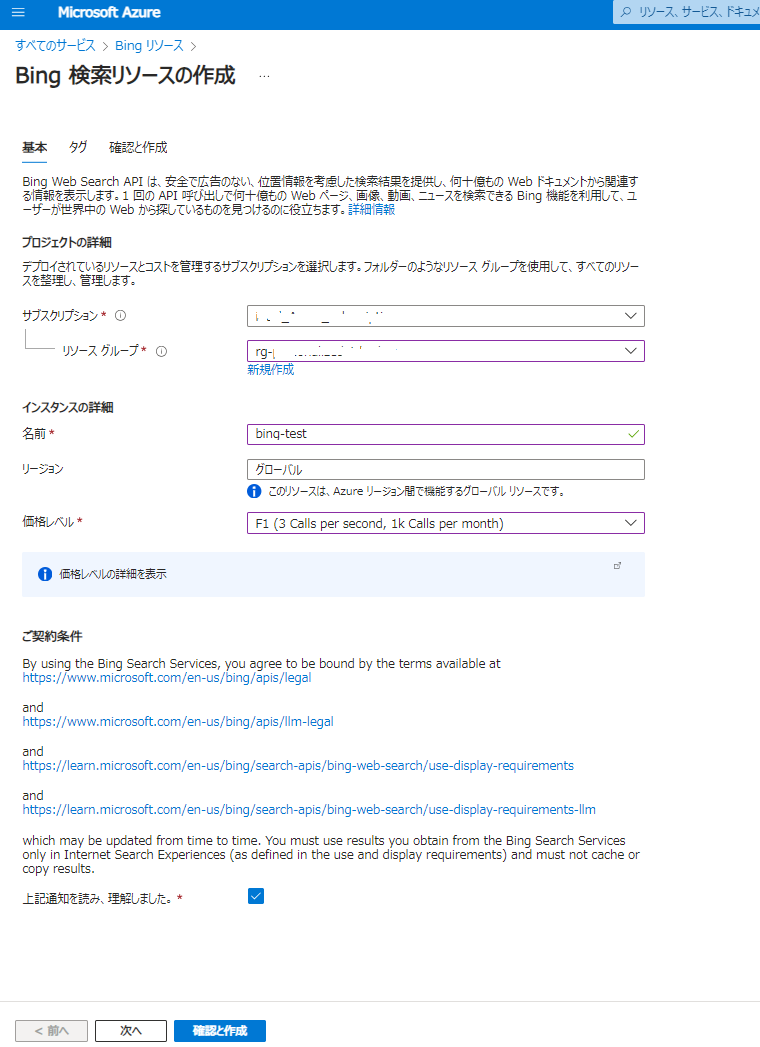
テストプログラムの作成
サンプルコードは、Bing Search の概要に記載されています。
// Copyright (c) Microsoft Corporation. All rights reserved.
// Licensed under the MIT License.

using Newtonsoft.Json;
using System;
using System.Text;
using System.Net;
using System.IO;
using System.Collections.Generic;

// This sample uses the Bing Web Search API v7 to retrieve different kinds of media from the web.

namespace BingWebSearch
{
    class Program
    {
        // Add your Bing Search V7 subscription key and endpoint to your environment variables
        static string subscriptionKey = Environment.GetEnvironmentVariable("BING_SEARCH_V7_SUBSCRIPTION_KEY");
        static string endpoint = Environment.GetEnvironmentVariable("BING_SEARCH_V7_ENDPOINT") + "/v7.0/search";

        const string query = "hummingbirds";

        static void Main()
        {
            // Create a dictionary to store relevant headers
            Dictionary<String, String> relevantHeaders = new Dictionary<String, String>();

            Console.OutputEncoding = Encoding.UTF8;

            Console.WriteLine("Searching the Web for: " + query);

            // Construct the URI of the search request
            var uriQuery = endpoint + "?q=" + Uri.EscapeDataString(query);

            // Perform the Web request and get the response
            WebRequest request = HttpWebRequest.Create(uriQuery);
            request.Headers["Ocp-Apim-Subscription-Key"] = subscriptionKey;
            HttpWebResponse response = (HttpWebResponse)request.GetResponseAsync().Result;
            string json = new StreamReader(response.GetResponseStream()).ReadToEnd();

            // Extract Bing HTTP headers
            foreach (String header in response.Headers)
            {
                if (header.StartsWith("BingAPIs-") || header.StartsWith("X-MSEdge-"))
                    relevantHeaders[header] = response.Headers[header];
            }

            // Show headers
            Console.WriteLine("
Relevant HTTP Headers:
");
            foreach (var header in relevantHeaders)
                Console.WriteLine(header.Key + ": " + header.Value);

            Console.WriteLine("
JSON Response:
");
            dynamic parsedJson = JsonConvert.DeserializeObject(json);
            Console.WriteLine(JsonConvert.SerializeObject(parsedJson, Formatting.Indented));
        }
    }
}
今回はこちらを使わずに、将来的に REST API することも見据えて、汎用ホストで作成していこうと思います。Visual Studio の プロジェクト テンプレート「ワーカー サービス」を使ってプロジェクトを作成します。また、下記 NuGet モジュールを追加することが必要となります。
- Microsoft.Extensions.Hosting
- Microsoft.Extensions.Http
- Newtonsoft.Json
Program.cs では以下のように、IHttpClientFactory などを DI します。
using MyCrag;

HostApplicationBuilder builder = Host.CreateApplicationBuilder(args);

builder.Services.AddHttpClient();
builder.Services.AddHostedService();
builder.Services.AddOptions().BindConfiguration(nameof(Settings));

using IHost host = builder.Build();
host.Run();
Worker.cs では、Bing Web Search API への問合せに コマンドライン引数(Query)を使用します。
using Microsoft.Extensions.Options;

namespace MyCrag
{
    internal class Worker : BackgroundService
    {
        private readonly IConfiguration _configuration;
        private readonly ILogger _logger;
        private readonly IHttpClientFactory _httpClientFactory;
        private readonly Settings _settings;

        public Worker(
            IConfiguration configuration,
            ILogger logger,
            IOptions settings,
            IHttpClientFactory httpClientFactory)
        {
            _configuration = configuration;
            _logger = logger;
            _settings = settings.Value;
            _httpClientFactory = httpClientFactory;
        }

        protected override async Task ExecuteAsync(CancellationToken stoppingToken)
        {
            string query = _configuration["Query"]?.Trim() ?? string.Empty;

            if (!string.IsNullOrEmpty(query))
            {
                await new BingWebSearchService(
                    _logger,
                    _httpClientFactory,
                    _settings.BingWebSearch).RunAsync(query);
            }
        }
    }
}
BingWebSearchService.cs で、Bing Web Search API に問合せてみます。こちらは、REST のサンプルページを参考にしました。
using Newtonsoft.Json;
using System.Net.Http.Headers;
namespace MyCrag
{
internal class BingWebSearchService
{
private readonly ILogger _logger;
private readonly IHttpClientFactory _httpClientFactory;
private readonly string _baseUri;
private readonly string _subscriptionKey;
private readonly string _languageCode;
private const string QUERY_PARAMETER = "?q="; // Required
private const string MKT_PARAMETER = "&mkt="; // Strongly suggested
private const string RESPONSE_FILTER_PARAMETER = "&responseFilter=";
private const string COUNT_PARAMETER = "&count=";
private const string OFFSET_PARAMETER = "&offset=";
private const string FRESHNESS_PARAMETER = "&freshness=";
private const string SAFE_SEARCH_PARAMETER = "&safeSearch=";
private const string TEXT_DECORATIONS_PARAMETER = "&textDecorations=";
private const string TEXT_FORMAT_PARAMETER = "&textFormat=";
private const string ANSWER_COUNT = "&answerCount=";
private const string PROMOTE = "&promote=";
public BingWebSearchService(
ILogger logger,
IHttpClientFactory httpClientFactory,
BingWebSearchSettings settings)
{
_logger = logger;
_httpClientFactory = httpClientFactory;
_subscriptionKey = settings.ApiKey;
_baseUri = settings.Endpoint;
_languageCode = settings.LanguageCode;
}
public async Task RunAsync(string searchString)
{
try
{
// Remember to encode query parameters like q, responseFilters, promote, etc.
var queryString = QUERY_PARAMETER + Uri.EscapeDataString(searchString);
queryString += MKT_PARAMETER + _languageCode;
//queryString += RESPONSE_FILTER_PARAMETER + Uri.EscapeDataString("webpages,news");
queryString += TEXT_DECORATIONS_PARAMETER + Boolean.TrueString;
HttpResponseMessage response = await MakeRequestAsync(queryString);
string? clientIdHeader = response.Headers.GetValues("X-MSEdge-ClientID").FirstOrDefault();
// This example uses dictionaries instead of objects to access the response data.
var contentString = await response.Content.ReadAsStringAsync();
Dictionary<string, object> searchResponse = JsonConvert.DeserializeObject<Dictionary<string, object>>(contentString);
if (response.IsSuccessStatusCode)
{
PrintResponse(searchResponse);
}
else
{
PrintErrors(response.Headers, searchResponse);
}
}
catch (Exception e)
{
Console.WriteLine(e.Message);
}
Console.WriteLine("\nPress ENTER to exit...");
Console.ReadLine();
}
async Task MakeRequestAsync(string queryString)
{
//var client = new HttpClient();
using HttpClient client = _httpClientFactory.CreateClient(nameof(BingWebSearchService));
// Request headers. The subscription key is the only required header but you should
// include User-Agent (especially for mobile), X-MSEdge-ClientID, X-Search-Location
// and X-MSEdge-ClientIP (especially for local aware queries).
client.DefaultRequestHeaders.Add("Ocp-Apim-Subscription-Key", _subscriptionKey);
return (await client.GetAsync(_baseUri + queryString));
}
// Prints the JSON response data for pole, mainline, and sidebar.
void PrintResponse(Dictionary<string, object> response)
{
Console.WriteLine("The response contains the following answers:\n");
var ranking = response["rankingResponse"] as Newtonsoft.Json.Linq.JToken;
Newtonsoft.Json.Linq.JToken position;
if ((position = ranking["pole"]) != null)
{
Console.WriteLine("Pole Position:\n");
DisplayAnswersByRank(position["items"], response);
}
if ((position = ranking["mainline"]) != null)
{
Console.WriteLine("Mainline Position:\n");
DisplayAnswersByRank(position["items"], response);
}
if ((position = ranking["sidebar"]) != null)
{
Console.WriteLine("Sidebar Position:\n");
DisplayAnswersByRank(position["items"], response);
}
}
// Displays each result based on ranking. Ranking contains the results for
// the pole, mainline, or sidebar section of the search results.
void DisplayAnswersByRank(Newtonsoft.Json.Linq.JToken items, Dictionary<string, object> response)
{
foreach (Newtonsoft.Json.Linq.JToken item in items)
{
var answerType = (string)item["answerType"];
Newtonsoft.Json.Linq.JToken index = -1;
// If the ranking item doesn't include an index of the result to
// display, then display all the results for that answer.
if ("WebPages" == answerType)
{
if ((index = item["resultIndex"]) == null)
{
DisplayAllWebPages(((Newtonsoft.Json.Linq.JToken)response["webPages"])["value"]);
}
else
{
DisplayWegPage(((Newtonsoft.Json.Linq.JToken)response["webPages"])["value"].ElementAt((int)index));
}
}
else if ("Images" == answerType)
{
if ((index = item["resultIndex"]) == null)
{
DisplayAllImages(((Newtonsoft.Json.Linq.JToken)response["images"])["value"]);
}
else
{
DisplayImage(((Newtonsoft.Json.Linq.JToken)response["images"])["value"].ElementAt((int)index));
}
}
else if ("Videos" == answerType)
{
if ((index = item["resultIndex"]) == null)
{
DisplayAllVideos(((Newtonsoft.Json.Linq.JToken)response["videos"])["value"]);
}
else
{
DisplayVideo(((Newtonsoft.Json.Linq.JToken)response["videos"])["value"].ElementAt((int)index));
}
}
else if ("News" == answerType)
{
if ((index = item["resultIndex"]) == null)
{
DisplayAllNews(((Newtonsoft.Json.Linq.JToken)response["news"])["value"]);
}
else
{
DisplayArticle(((Newtonsoft.Json.Linq.JToken)response["news"])["value"].ElementAt((int)index));
}
}
else if ("RelatedSearches" == answerType)
{
if ((index = item["resultIndex"]) == null)
{
DisplayAllRelatedSearches(((Newtonsoft.Json.Linq.JToken)response["relatedSearches"])["value"]);
}
else
{
DisplayRelatedSearch(((Newtonsoft.Json.Linq.JToken)response["relatedSearches"])["value"].ElementAt((int)index));
}
}
else if ("Entities" == answerType)
{
if ((index = item["resultIndex"]) == null)
{
DisplayAllEntities(((Newtonsoft.Json.Linq.JToken)response["entities"])["value"]);
}
else
{
DisplayEntity(((Newtonsoft.Json.Linq.JToken)response["entities"])["value"].ElementAt((int)index));
}
}
else if ("Places" == answerType)
{
if ((index = item["resultIndex"]) == null)
{
DisplayAllPlaces(((Newtonsoft.Json.Linq.JToken)response["places"])["value"]);
}
else
{
DisplayPlace(((Newtonsoft.Json.Linq.JToken)response["places"])["value"].ElementAt((int)index));
}
}
else if ("Computation" == answerType)
{
DisplayComputation((Newtonsoft.Json.Linq.JToken)response["computation"]);
}
else if ("Translations" == answerType)
{
DisplayTranslations((Newtonsoft.Json.Linq.JToken)response["translations"]);
}
else if ("TimeZone" == answerType)
{
DisplayTimeZone((Newtonsoft.Json.Linq.JToken)response["timeZone"]);
}
else
{
Console.WriteLine("\nUnknown answer type: {0}\n", answerType);
}
}
}
// Displays all webpages in the Webpages answer.
void DisplayAllWebPages(Newtonsoft.Json.Linq.JToken webpages)
{
foreach (Newtonsoft.Json.Linq.JToken webpage in webpages)
{
DisplayWegPage(webpage);
}
}
// Displays a single webpage.
void DisplayWegPage(Newtonsoft.Json.Linq.JToken webpage)
{
string rule = null;
// Some webpages require attribution. Checks if this page requires
// attribution and gets the list of attributions to apply.
Dictionary<string, string> rulesByField = null;
rulesByField = GetRulesByField(webpage["contractualRules"]);
Console.WriteLine("\tWebpage\n");
Console.WriteLine("\t\tName: " + webpage["name"]);
Console.WriteLine("\t\tUrl: " + webpage["url"]);
Console.WriteLine("\t\tDisplayUrl: " + webpage["displayUrl"]);
Console.WriteLine("\t\tSnippet: " + webpage["snippet"]);
// Apply attributions if they exist.
if (null != rulesByField)
{
if (rulesByField.TryGetValue("snippet", out rule))
{
Console.WriteLine("\t\t\tData from: " + rulesByField["snippet"]);
}
}
Console.WriteLine();
}
// Displays all images in the Images answer.
void DisplayAllImages(Newtonsoft.Json.Linq.JToken images)
{
foreach (Newtonsoft.Json.Linq.JToken image in images)
{
DisplayImage(image);
}
}
// Displays a single image.
void DisplayImage(Newtonsoft.Json.Linq.JToken image)
{
Console.WriteLine("\tImage\n");
Console.WriteLine("\t\tThumbnail: " + image["thumbnailUrl"]);
Console.WriteLine();
}
// Displays all videos in the Videos answer.
void DisplayAllVideos(Newtonsoft.Json.Linq.JToken videos)
{
foreach (Newtonsoft.Json.Linq.JToken video in videos)
{
DisplayVideo(video);
}
}
// Displays a single video.
void DisplayVideo(Newtonsoft.Json.Linq.JToken video)
{
Console.WriteLine("\tVideo\n");
Console.WriteLine("\t\tEmbed HTML: " + video["embedHtml"]);
Console.WriteLine();
}
// Displays all news articles in the News answer.
void DisplayAllNews(Newtonsoft.Json.Linq.JToken news)
{
foreach (Newtonsoft.Json.Linq.JToken article in news)
{
DisplayArticle(article);
}
}
// Displays a single news article.
void DisplayArticle(Newtonsoft.Json.Linq.JToken article)
{
// News articles require attribution. Gets the list of attributions to apply.
Dictionary<string, string> rulesByField = null;
rulesByField = GetRulesByField(article["contractualRules"]);
Console.WriteLine("\tArticle\n");
Console.WriteLine("\t\tName: " + article["name"]);
Console.WriteLine("\t\tURL: " + article["url"]);
Console.WriteLine("\t\tDescription: " + article["description"]);
Console.WriteLine("\t\tArticle from: " + rulesByField["global"]);
Console.WriteLine();
}
// Displays all related search in the RelatedSearches answer.
void DisplayAllRelatedSearches(Newtonsoft.Json.Linq.JToken searches)
{
foreach (Newtonsoft.Json.Linq.JToken search in searches)
{
DisplayRelatedSearch(search);
}
}
// Displays a single related search query.
void DisplayRelatedSearch(Newtonsoft.Json.Linq.JToken search)
{
Console.WriteLine("\tRelatedSearch\n");
Console.WriteLine("\t\tName: " + search["displayText"]);
Console.WriteLine("\t\tURL: " + search["webSearchUrl"]);
Console.WriteLine();
}
// Displays all entities in the Entities answer.
void DisplayAllEntities(Newtonsoft.Json.Linq.JToken entities)
{
foreach (Newtonsoft.Json.Linq.JToken entity in entities)
{
DisplayEntity(entity);
}
}
// Displays a single entity.
void DisplayEntity(Newtonsoft.Json.Linq.JToken entity)
{
string rule = null;
// Entities require attribution. Gets the list of attributions to apply.
Dictionary<string, string> rulesByField = null;
rulesByField = GetRulesByField(entity["contractualRules"]);
Console.WriteLine("\tEntity\n");
Console.WriteLine("\t\tName: " + entity["name"]);
if (entity["image"] != null)
{
Console.WriteLine("\t\tImage: " + entity["image"]["thumbnail"]);
if (rulesByField.TryGetValue("image", out rule))
{
Console.WriteLine("\t\t\tImage from: " + rule);
}
}
if (entity["description"] != null)
{
Console.WriteLine("\t\tDescription: " + entity["description"]);
if (rulesByField.TryGetValue("description", out rule))
{
Console.WriteLine("\t\t\tData from: " + rulesByField["description"]);
}
}
else
{
// See if presentation info can shed light on what this entity is.
var hintCount = entity["entityPresentationInfo"]["entityTypeHints"].Count();
Console.WriteLine("\t\tEntity hint: " + entity["entityPresentationInfo"]["entityTypeHints"][hintCount - 1]);
}
Console.WriteLine();
}
// Displays all places in the Places answer.
void DisplayAllPlaces(Newtonsoft.Json.Linq.JToken places)
{
foreach (Newtonsoft.Json.Linq.JToken place in places)
{
DisplayPlace(place);
}
}
// Displays a single place.
void DisplayPlace(Newtonsoft.Json.Linq.JToken place)
{
Console.WriteLine("\tPlace\n");
Console.WriteLine("\t\tName: " + place["name"]);
Console.WriteLine("\t\tPhone: " + place["telephone"]);
Console.WriteLine("\t\tWebsite: " + place["url"]);
Console.WriteLine();
}
// Displays the Computation answer.
void DisplayComputation(Newtonsoft.Json.Linq.JToken expression)
{
Console.WriteLine("\tComputation\n");
Console.WriteLine("\t\t{0} is {1}", expression["expression"], expression["value"]);
Console.WriteLine();
}
// Displays the Translation answer.
void DisplayTranslations(Newtonsoft.Json.Linq.JToken translation)
{
// Some webpages require attribution. Checks if this page requires
// attribution and gets the list of attributions to apply.
Dictionary<string, string> rulesByField = null;
rulesByField = GetRulesByField(translation["contractualRules"]);
// The translatedLanguageName field contains a 2-character language code,
// so you might want to provide the means to print Spanish instead of es.
Console.WriteLine("\tTranslation\n");
Console.WriteLine("\t\t\"{0}\" translates to \"{1}\" in {2}", translation["originalText"], translation["translatedText"], translation["translatedLanguageName"]);
Console.WriteLine("\t\tTranslation by " + rulesByField["global"]);
Console.WriteLine();
}
// Displays the TimeZone answer. This answer has multiple formats, so you need to figure
// out which fields exist in order to format the answer.
void DisplayTimeZone(Newtonsoft.Json.Linq.JToken timeZone)
{
Console.WriteLine("\tTime zone\n");
if (timeZone["primaryCityTime"] != null)
{
var time = DateTime.Parse((string)timeZone["primaryCityTime"]["time"]);
Console.WriteLine("\t\tThe time in {0} is {1}:", timeZone["primaryCityTime"]["location"], time);
if (timeZone["otherCityTimes"] != null)
{
Console.WriteLine("\t\tThere are {0} other time zones", timeZone["otherCityTimes"].Count());
}
}
if (timeZone["date"] != null)
{
Console.WriteLine("\t\t" + timeZone["date"]);
}
if (timeZone["primaryResponse"] != null)
{
Console.WriteLine("\t\t" + timeZone["primaryResponse"]);
}
if (timeZone["timeZoneDifference"] != null)
{
Console.WriteLine("\t\t{0} {1}", timeZone["description"], timeZone["timeZoneDifference"]["text"]);
}
if (timeZone["primaryTimeZone"] != null)
{
Console.WriteLine("\t\t" + timeZone["primaryTimeZone"]["timeZoneName"]);
}
Console.WriteLine();
}
// Checks if the result includes contractual rules and builds a dictionary of
// the rules.
Dictionary<string, string> GetRulesByField(Newtonsoft.Json.Linq.JToken contractualRules)
{
if (null == contractualRules)
{
return null;
}
var rules = new Dictionary<string, string>();
foreach (Newtonsoft.Json.Linq.JToken rule in contractualRules as Newtonsoft.Json.Linq.JToken)
{
// Use the rule's type as the key.
string key = null;
string value = null;
var index = ((string)rule["_type"]).LastIndexOf('/');
var ruleType = ((string)rule["_type"]).Substring(index + 1);
string attribution = null;
if (ruleType == "LicenseAttribution")
{
attribution = (string)rule["licenseNotice"];
}
else if (ruleType == "LinkAttribution")
{
attribution = string.Format("{0}({1})", (string)rule["text"], (string)rule["url"]);
}
else if (ruleType == "MediaAttribution")
{
attribution = (string)rule["url"];
}
else if (ruleType == "TextAttribution")
{
attribution = (string)rule["text"];
}
// If the rule targets specific data in the result; for example, the
// snippet field, use the target's name as the key. Multiple rules
// can apply to the same field.
if ((key = (string)rule["targetPropertyName"]) != null)
{
if (rules.TryGetValue(key, out value))
{
rules[key] = value + " | " + attribution;
}
else
{
rules.Add(key, attribution);
}
}
else
{
// Otherwise, the rule applies to the result. Uses 'global' as the key
// value for this case.
key = "global";
if (rules.TryGetValue(key, out value))
{
rules[key] = value + " | " + attribution;
}
else
{
rules.Add(key, attribution);
}
}
}
return rules;
}
// Print any errors that occur. Depending on which part of the service is
// throwing the error, the response may contain different error formats.
void PrintErrors(HttpResponseHeaders headers, Dictionary<String, object> response)
{
Console.WriteLine("The response contains the following errors:\n");
object value;
if (response.TryGetValue("error", out value)) // typically 401, 403
{
PrintError(response["error"] as Newtonsoft.Json.Linq.JToken);
}
else if (response.TryGetValue("errors", out value))
{
// Bing API error
foreach (Newtonsoft.Json.Linq.JToken error in response["errors"] as Newtonsoft.Json.Linq.JToken)
{
PrintError(error);
}
// Included only when HTTP status code is 400; not included with 401 or 403.
IEnumerable headerValues;
if (headers.TryGetValues("BingAPIs-TraceId", out headerValues))
{
Console.WriteLine("\nTrace ID: " + headerValues.FirstOrDefault());
}
}
}
void PrintError(Newtonsoft.Json.Linq.JToken error)
{
string value = null;
Console.WriteLine("Code: " + error["code"]);
Console.WriteLine("Message: " + error["message"]);
if ((value = (string)error["parameter"]) != null)
{
Console.WriteLine("Parameter: " + value);
}
if ((value = (string)error["value"]) != null)
{
Console.WriteLine("Value: " + value);
}
}
}
}
キー情報は下記から取得します。エンドポイントのURLは「https://api.bing.microsoft.com/v7.0/search」です。これらを設定ファイルに記載します。

テストプログラムの実行
では、コマンドライン引数に「Query="CRAG について教えてください。"」と入れて、作成したプログラムを実行していきます。実行結果は以下の通りとなりました。
The response contains the following answers:
Mainline Position:
Webpage
Name: RAGの新しい手法「CRAG」を3分で理解する - Zenn
Url: https://zenn.dev/knowledgesense/articles/bb5e15abb3c547
DisplayUrl: https://zenn.dev/knowledgesense/articles/bb5e15abb3c547
Snippet: 本論文では、RAGの検索結果を修正・改善する手法「Corrective Retrieval Augmented Generation (CRAG)」を提案しています。 CRAGの主なポイントは以下の3つです。 検索した文書の内容が入力に適しているかを、軽量な検索評価 モデルで判定します。 判定結果に基づいて、文書の修正や追加検索をします. 検索した文書が不十分な場合、Webを使って追加の知識を収集します。 これにより、「そもそもRAGで取得してきたドキュメントが間違っていた場合」に知識を補うことが出来ます。 検索 した文書を細かく分解し、ドキュメントを減らしたり、再構成したりします。 これによりノイズ情報を除去し、回答性能を高めます 。
Webpage
Name: 【論文瞬読】CRAGが明かす衝撃の真実:検索拡張生成AI ...
Url: https://note.com/ainest/n/n3a61ec3a032d
DisplayUrl: https://note.com/ainest/n/n3a61ec3a032d
Snippet: まず、RAGについて簡単におさらいしましょう。RAGは、大規模言語モデル(LLM)に外部知識をプラスする技術です。例えば、「2024年の東京の人口は?」という質問に答える時、LLMが自身の学習データだけでなく、最新のWeb情報も
Webpage
Name: RAG Fusion と CRAGの組み合わせを試してみた - Zenn
Url: https://zenn.dev/yumefuku/articles/llm-fusion-crag
DisplayUrl: https://zenn.dev/yumefuku/articles/llm-fusion-crag
Snippet: 今回はRAGの手法「RAG Fusion」と「CRAG」の組み合わせを実験的に試してみます。 通常のRAGの実装では一つの質問に対してインデックスからドキュメントの検索を行い、検索結果をそのままコンテキストとしてllmに渡し ます。 RAG Fusionでは、通常のRAGに「類似した質問の生成」と「リランキング (Reciprocal Rank Fusion)」の要素が加わります 。 類似した質問を使い検索することで、取得するドキュメントの多様性を得られるのが主な利点です。 質問から回答までの流れは以下のようになります。 リランキングに使う(ドキュメントのスコアを算出する)計算式は以下です。
Webpage
Name: 【2024年9月最新】Corrective RAGの導入方法とCRAGの最新 ...
Url: https://ainow.jp/corrective-rag/
DisplayUrl: https://ainow.jp/corrective-rag
Snippet: Corrective RAG(Corrective Retrieval Augmented Generation)は、従来のRAG技術にさらに正確な回答を提供するための補正機能を加えた最新の生成モデルです。 データ検索と生成の両方を一体化させることで、ユーザーの質問に対してより適切な回答を提供する能力が向上します。 この記事では、Corrective RAGの基本概念や導入のメリット、具体的な設定 手順について詳しく解説します。 また、CRAGの最新動向や実際の適用事例にも触れ、どのようにしてこの技術がビジネスに貢献する のかを探ります。 Corrective RAGとは何か?
Webpage
Name: Corrective Retrieval Augmented Generation RAG論文解説
Url: https://zenn.dev/chenchang/articles/484811d9b8930a
DisplayUrl: https://zenn.dev/chenchang/articles/484811d9b8930a
Snippet: Corrective Retrieval Augmented Generation (以下、cRAG)は、RAGにおいて誤った検索 が行われた際に生成がうまく行かない問題を解決するための方法になります。 RAGにおいて誤った検索が行われるケースはどうし ても発生してしまうものですが、その時にRAGの強みでもある「検索に基づいた生成」が想定外に悪く働いてしまいます。 なので検索が誤るケースに対応することはRAGアプリケーションにおいて非常に重要な要素です。 このcRAGを用いれば、誤った検索に対応することができるということのようです。 RAGにおいて誤った検索に頭を悩ませている人には非常に有効な手法になり得ますので、実際の手法について見ていきましょう.
Webpage
Name: 高度なRAG検索戦略:Corrective Retrieval Augmented ...
Url: https://note.com/ippei_suzuki_us/n/n8ebfe3294cdf
DisplayUrl: https://note.com/ippei_suzuki_us/n/n8ebfe3294cdf
Snippet: 簡単な実装例、原則、コードの説明、およびCRAGに関する洞察 この記事では、オープンブックテスト(試験中に教科書や自分のノート、場合によってはオンライン資源を参照することが許可される試験形式)に参加するプロセスをCRAGを使って実証してみます。 オープンブックテストで解答を ...
Webpage
Name: Self-Reflective RAG その1 CRAG準備編 - Qiita
Url: https://qiita.com/isanakamishiro2/items/9e4bc3ebb740f1d7aa9d
DisplayUrl: https://qiita.com/isanakamishiro2/items/9e4bc3ebb740f1d7aa9d
Snippet: LLMを使って自己修正的に低品質の検索結果や生成を補足するために、Self-Reflective RAGという用語が論文では紹介されています。 基本的なRAGフローは、単にチェーンを使用するだけで、LLMは取得したドキュメントに基づいて何を生成するかを決定します。
Webpage
Name: 『CRAG -- Comprehensive RAG Benchmark』をChatGPT+達 ...
Url: https://note.com/karasu_toragara/n/n97432fd44d61
DisplayUrl: https://note.com/karasu_toragara/n/n97432fd44d61
Snippet: この論文では、LLMの知識不足を補うためのRetrieval-Augmented Generation(RAG)技術の性能を評価す るための包括的なベンチマークCRAGを提案しています。 CRAGは現実のQAタスクの多様性と動的性を反映した4,409のQAペアを含み、RAGシステムの現実適用能力を測ることを目的としています。 論文の実験結果からは、現在の最先端のRAGシステムでも63%の質問にしか誤りなく回答できず、特に情報の変動が激しい事実、マイナーな事実、複雑な質問(マルチホップ質問やポストプロセッシングが必要な質問など)への対応が不十分であることが示唆されています。 これは、RAGシステムが検索結果のノイズを適切に処理できず、誤った情報を生成するリスクが高いことに起因すると考えられます。
Webpage
Name: LangGraphでCRAGエージェントを構築!『ヒロアカ』について聞く
Url: https://highreso.jp/edgehub/machinelearning/langgraphcrag.html
DisplayUrl: https://highreso.jp/.../machinelearning/langgraphcrag.html
Snippet: CRAG (Corrective-RAG)とは、RAGで取得したドキュメントが、質問に対して正しいかを評価する手法 です。 この記事では、LangGraphを使ってCRAGエージェントを構築する方法を紹介します。 12/25開催の無料ウェビナー! 【参加者 募集中】RAG進化のさらに先へ! 自律型AIエージェント. CRAG (Corrective-RAG)とは、RAGで取得したドキュメントが、質問に対して正しいかを評価する手法です。 この記事では、RAGで取得したドキュメントが、質問に対して関連性が不十分である場合に、WEB検索 で回答を補完するCRAGを構築します。 LangGraphは、LangChainやLLMを使ってAIエージェントを構築するライブラリです。
Webpage
Name: 包括的なRAG評価ベンチマーク『CRAG』Metaなどが開発 - AIDB
Url: https://ai-data-base.com/archives/70850
DisplayUrl: https://ai-data-base.com/archives/70850
Snippet: RAGは、質問に対して外部のソースから関連情報を検索し、その情報を活用して回答を生成する手法です。しかし、RAGにも下記のような課題が残されています。
RelatedSearch
Name: crag とは
URL: https://www.bing.com/search?q=crag+%E3%81%A8%E3%81%AF
RelatedSearch
Name: crag 使い方
URL: https://www.bing.com/search?q=crag+%E4%BD%BF%E3%81%84%E6%96%B9
RelatedSearch
Name: crag 意味
URL: https://www.bing.com/search?q=crag+%E6%84%8F%E5%91%B3
RelatedSearch
Name: crag 評価方法
URL: https://www.bing.com/search?q=crag+%E8%A9%95%E4%BE%A1%E6%96%B9%E6%B3%95
RelatedSearch
Name: crag 日本語化
URL: https://www.bing.com/search?q=crag+%E6%97%A5%E6%9C%AC%E8%AA%9E%E5%8C%96
RelatedSearch
Name: crag 評価ツール
URL: https://www.bing.com/search?q=crag+%E8%A9%95%E4%BE%A1%E3%83%84%E3%83%BC%E3%83%AB
RelatedSearch
Name: crag 手法
URL: https://www.bing.com/search?q=crag+%E6%89%8B%E6%B3%95
RelatedSearch
Name: crag 論文
URL: https://www.bing.com/search?q=crag+%E8%AB%96%E6%96%87
Press ENTER to exit...
まとめ
いかがだったでしょうか。
今回は、Bing Search API を使って、RAGを構築してみました。これだけでもアイデア次第で、いろいろなシーンで活用できるかと思いますのでぜひ参考にしてみてください。
次回は、AI Search や Azure OpenAI も絡めて、CRAG 構成でプログラムを実行していきたいと思います。
また、AI Search の具体的な活用方法等のブログもたくさんありますのでご覧ください!
QUICK E-Solutionsでは、「AIチャットボット構築サービス」をはじめとして、各AIサービスを利用したシステム導入のお手伝いをしております。それ以外でも QESでは様々なアプリケーションの開発・導入を行っております。提供するサービス・ソリューションにつきましては こちら に掲載しております。
システム開発・構築でお困りの問題や弊社が提供するサービス・ソリューションにご興味を抱かれましたら、是非一度 お問い合わせ ください。
※このブログで参照されている、Microsoft、Microsoft 365、Bing Web Search、Azure OpenAI、AI Search その他のマイクロソフト製品およびサービスは、米国およびその他の国におけるマイクロソフトの商標または登録商標です。
※その他の会社名、製品名は各社の登録商標または商標です。