記事公開日
Hands-on with AWS Kiro's Agent Steering Feature Part2


Key Takeaways
This article explains the process of implementing user authentication and data isolation in a To-Do list application using AWS Kiro's "Agent Steering" feature. We will introduce practical techniques to ensure the AI correctly understands unique constraints intended by the developer.
- Implementing Strict Validation:
We verify methods for defining specific numerical constraints, such as "username at least 3 characters" and "password at least 4 characters," within a Steering file to ensure they are accurately reflected in the AI-generated code. - Data Isolation in Multi-user Environments:
We defined naming conventions that append the username to localStorage keys. By having the AI learn from "Positive and Negative Examples," we confirmed that user-specific data storage logic can be generated 100% as intended. - Automating Development Efficiency and Quality:
In response to the challenge of "data contamination" that the author actually faced, we demonstrate through a unique demo the convenience of Steering in maintaining consistent project-specific architecture policies without repetitive prompting.
Introduction
Hello. This is Goto from the DX Solution Sales Department.
In this article, I added a user login function to the To-Do list application created in the previous post.
Through this demo, I will delve deeper into the convenience of the Steering feature.
↓ The previous article can be found here:

Demo
Content and Purpose of the Demo
Pre-create Steering definitions regarding user login functionality.
Add user login features to the existing To-Do list application.
<Demo Purpose>
Verify if Kiro proposes and implements features according to the user login definitions set in Steering.
<Demo Flow>
① Pre-create definitions for the user login function in Steering.
↓
② After creating Steering, instruct Kiro to add the user login function.
↓
③ Verify if Kiro reads the Steering content and if the script revision proposal follows the definitions.
↓
④ After revising the script, check the actual operation to confirm it behaves as intended.
Creating Steering Files
We will set the definitions for the user login function. Following Steering best practices, I created the following two Steering files:
-
「passwordrule.md」
Defined password constraints to be referenced when creating user login scripts.
<Content>
① Limit usernames to 3+ characters and passwords to 4+ characters. Registration is blocked otherwise.
② Display password rules to the user.
③ Display an alert if the username and password do not match during login.--- inclusion: fileMatch fileMatch: ["script.js"] --- # Specific Constraints for Authentication Logic ## 1. Input Validation - **Constraint**: Require at least 3 characters for the username and 4 characters for the password. - **Alert**: If conditions are not met, display "Username must be at least 3 characters" or "Password must be at least 4 characters" in Japanese. - **Benefit**: To prevent invalid data formats from being saved in localStorage and avoid app crashes due to data integrity errors. ## 2. Behavior on Login Failure - **Condition**: Username does not exist or password does not match. - **Action**: 1. Display alert: "Invalid username or password." 2. Clear the value of the password input field (`loginPassword`). 3. Move focus to `loginPassword`. - **Benefit**: To maintain UX by clearly informing the user what went wrong while allowing immediate re-entry. ## 3. Security: Password Handling - **Constraint**: Always use the `hashPassword` method during registration and verification; do not compare or save raw passwords. - **Benefit**: To protect user privacy based on the Steering security policy, even if localStorage data is viewed.
-
「storagekeyrule.md」
Defined storage key usage and saving methods accompanying the user login function.
<Content>
① Establishment of user-specific storage methods to prevent data contamination in multi-user environments.
② Providing Positive and Negative code examples as a reference for script generation.--- inclusion: fileMatch fileMatch: ["script.js"] --- ### Storage Key Naming Convention (`storage-key-conventions.md`) Implementation example to prevent data confusion in multi-user environments. # Positive and Negative Storage Management Examples ## 1. User-Specific Data Isolation - **Rule**: localStorage keys must always be retrieved via `this.storageKeys` and suffixed with the username. ### ✕ Negative Example ```javascript // Reason: Using a fixed key name will cause data to mix with other users const data = localStorage.getItem('todoTasks'); // Recommended: Dynamically use keys per user authenticated by AuthManager this.storageKeys = { tasks: `todoTasks_${username}`, deletedTasks: `todoDeletedTasks_${username}` }; // Usage const savedTasks = localStorage.getItem(this.storageKeys.tasks); ```
Please refer to the following blog when creating Steering files.
↓ Describes best practices for creating Steering files.
*Includes the Steering created this time as a reference example.
↓ This article explores Steering file structure and the basics of multi-rule management. Check it out if you're interested!
Confirming the Application of Steering
I will try adding the user login function to the existing To-Do list application. I'll verify if Kiro proposes solutions as intended by referencing the created steering files "passwordrule.md" and "storagekeyrule.md".
Expected Behavior
Read "passwordrule.md" and "storagekeyrule.md" and propose code revisions suitable for the set specifications.
Verification Points for Each Steering File
・"passwordrule.md"
Does it create code following the password setting constraints? Does it propose and implement according to the numerical and behavioral constraints set?
・"storagekeyrule.md"
Does it understand the criteria for Positive/Negative examples shown in the steering file and propose/implement based on the Positive code?
Instructing to add the user login function.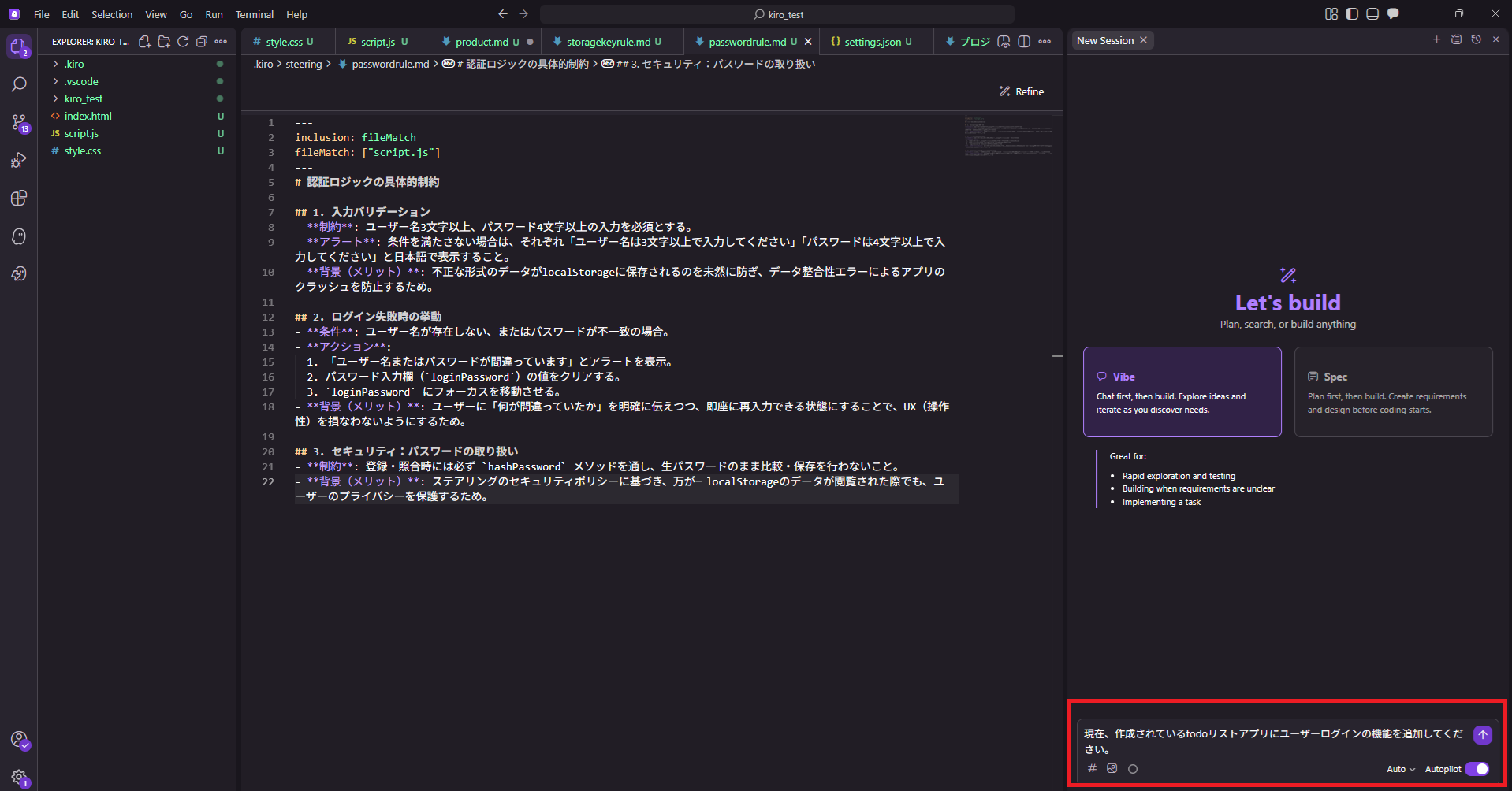
It checked the existing script and proposed revision points.
Checking the details of the changes, the following proposals were made:
- Addition of user login function and accompanying UI screen.
- Addition of password function and specification of limits (password hashing and input constraints).
- Implementation plan for storage key saving (establishment of user-specific saving methods).
Since all of the above were exactly as I intended, let's have it execute the revisions.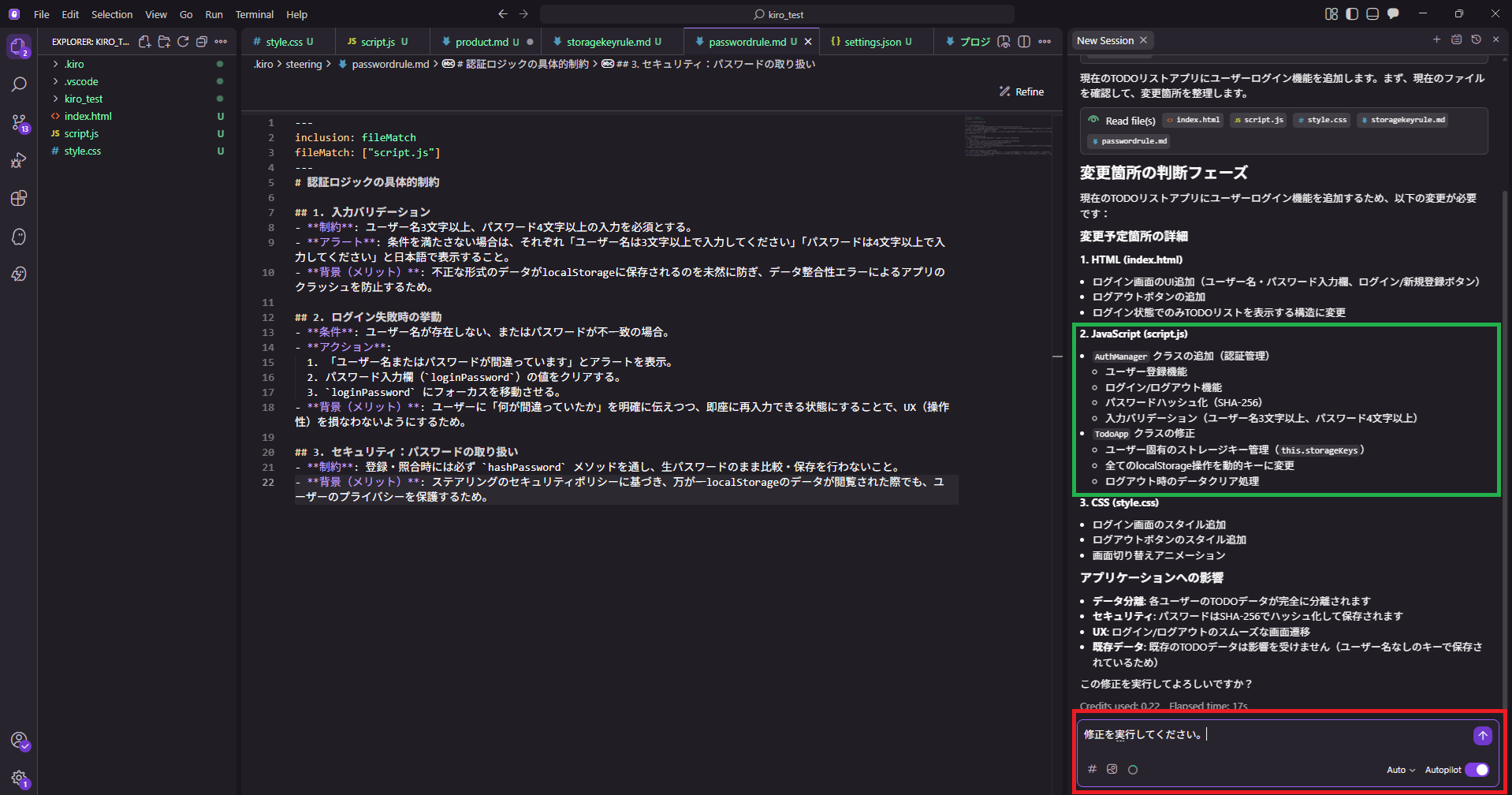
The script was revised and the user login function was implemented!
Checking the script, I can confirm that the password input validation was implemented as set in the steering file.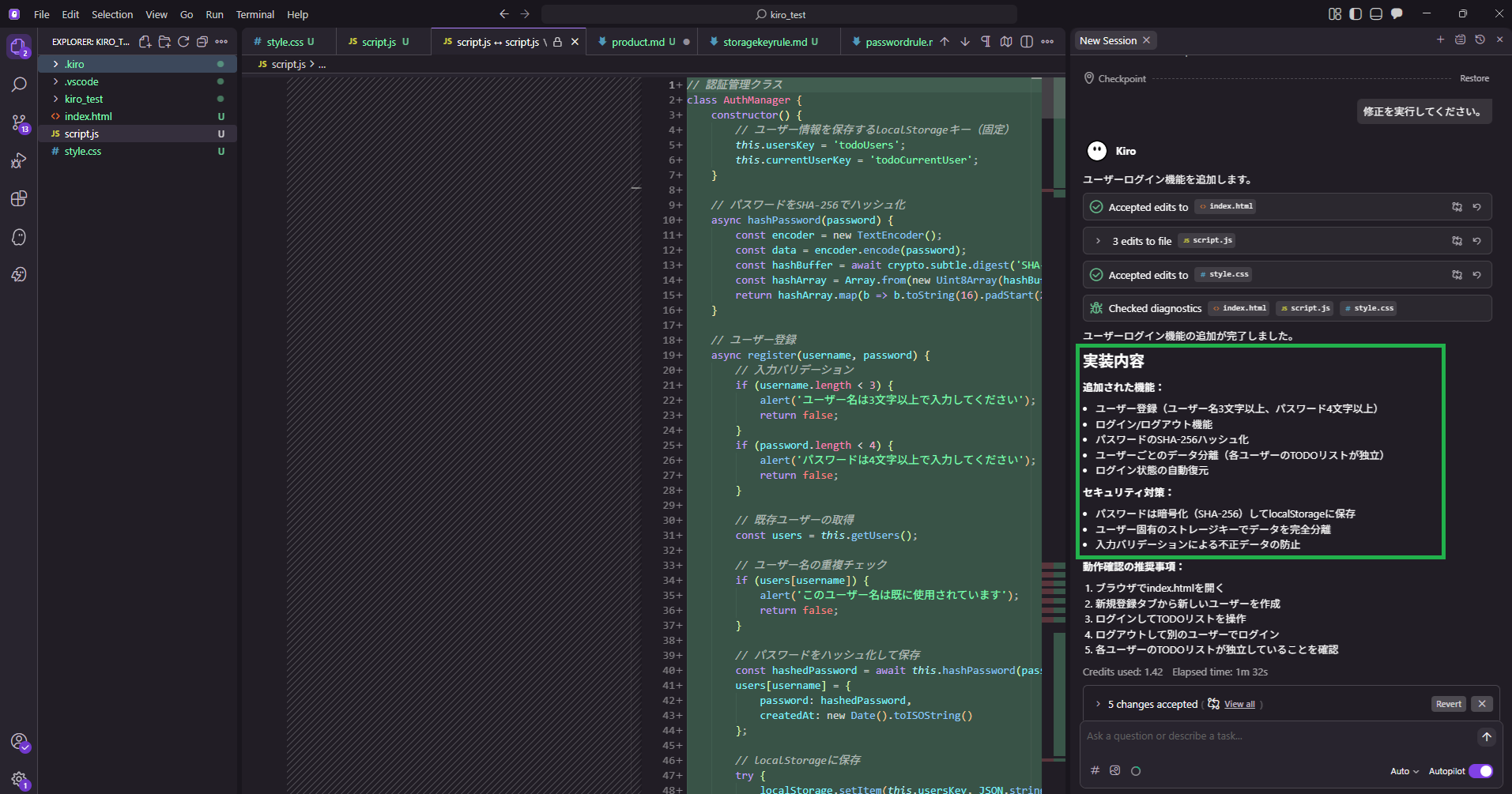
Regarding storage key saving, it understood the Positive/Negative criteria shown in the steering file and implemented it with the Positive code.
This established a user-specific storage method, preventing user data contamination.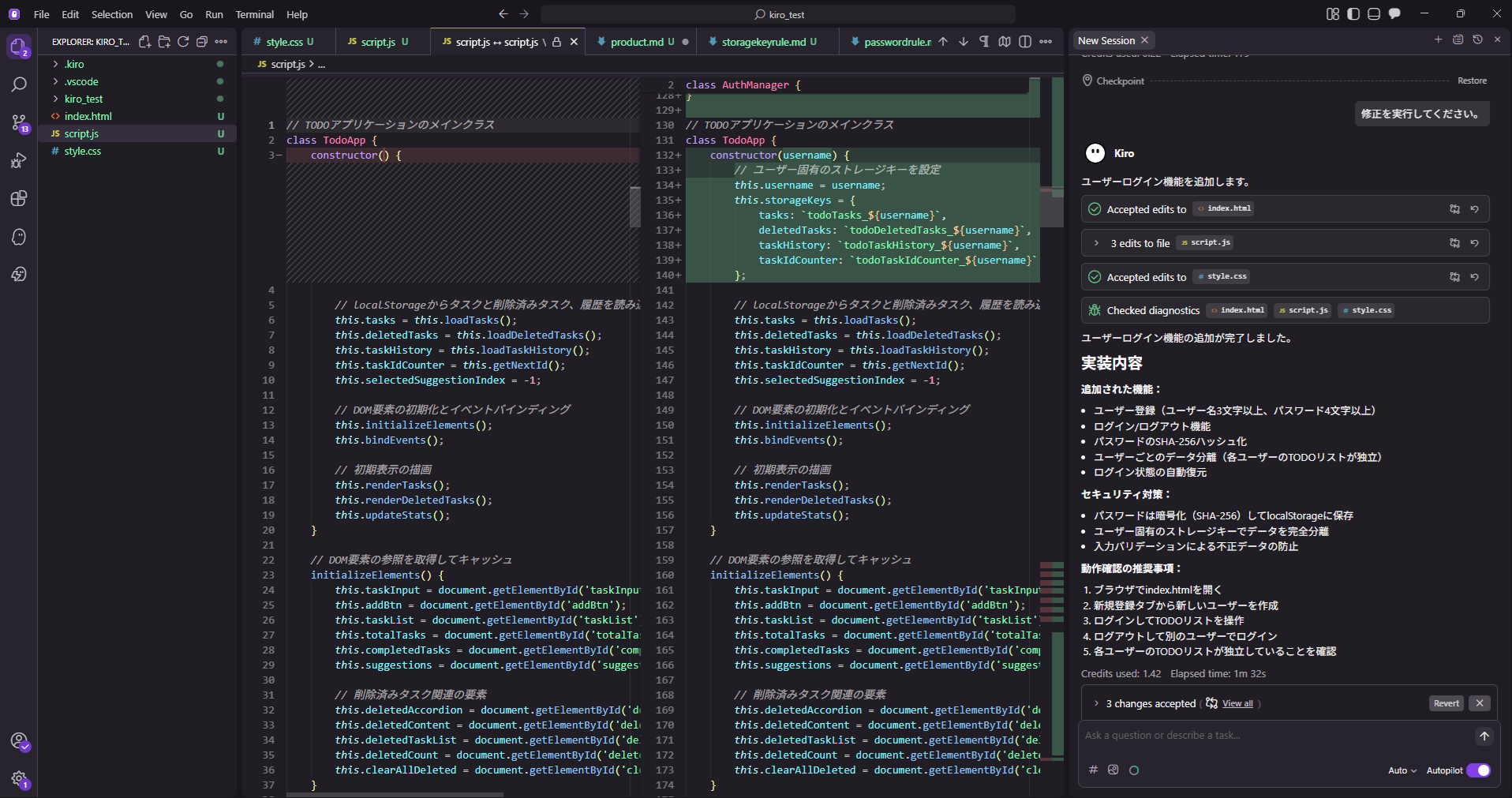
When launching the To-Do list app, the user login screen appeared.
I also confirmed that a new registration screen was added.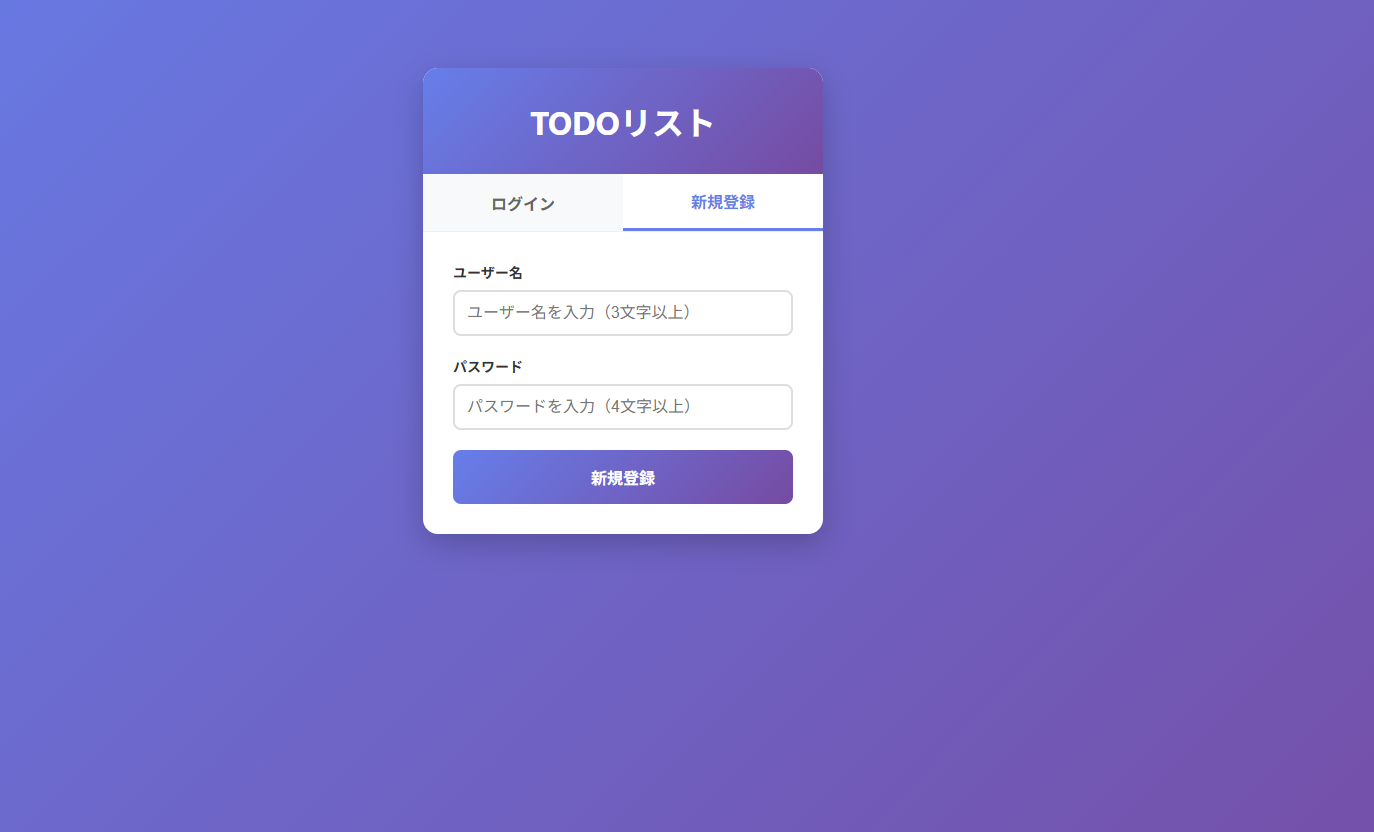
Operation Check of the Application
1. Confirming Application of "passwordrule.md"
First, I'll check if the password setting rules defined in "passwordrule.md" are followed.
- Requirement: Username must be at least 3 characters.
An error occurred when the username was shorter than the required length. An alert was displayed along with the error message.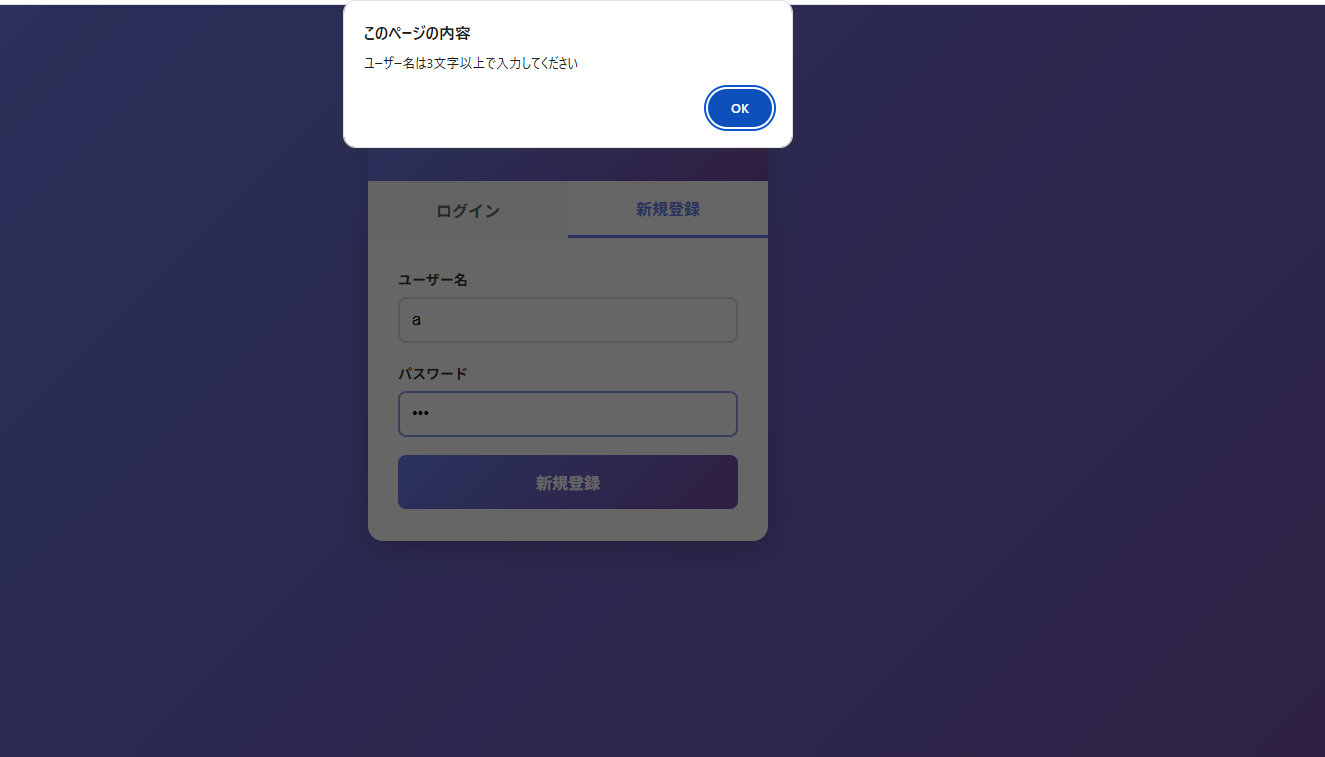
- Requirement: Password must be at least 4 characters.
An error occurred when the password was shorter than the required length. Similarly, an alert was displayed with the error.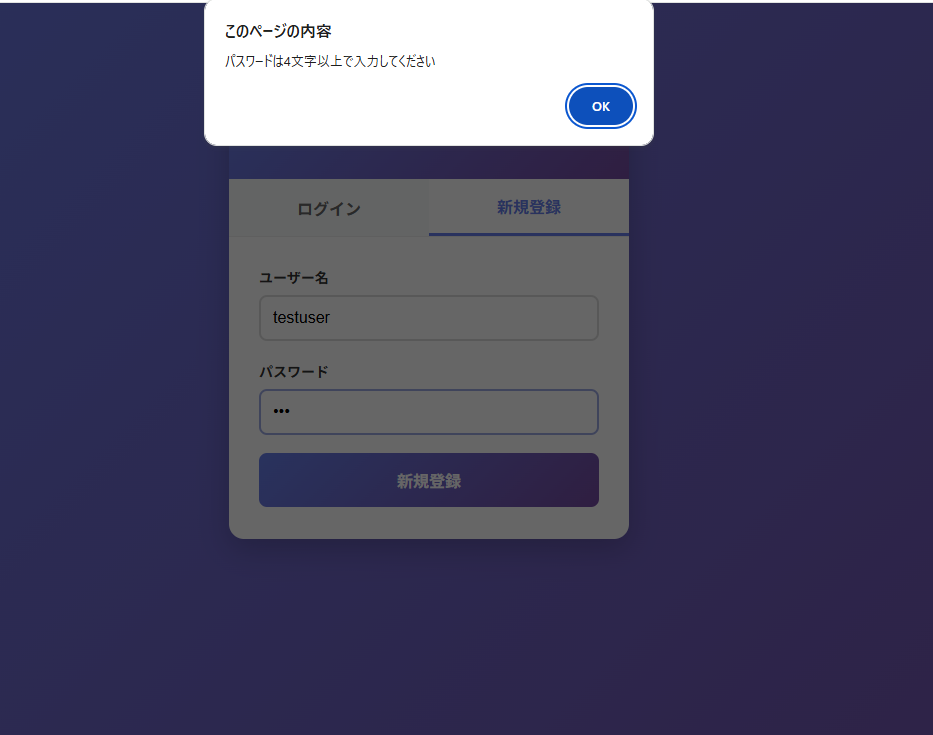
I confirmed that the password restriction rules were applied without issues.
Now, let's create a user "GotoTask" following the rules. I was able to register successfully.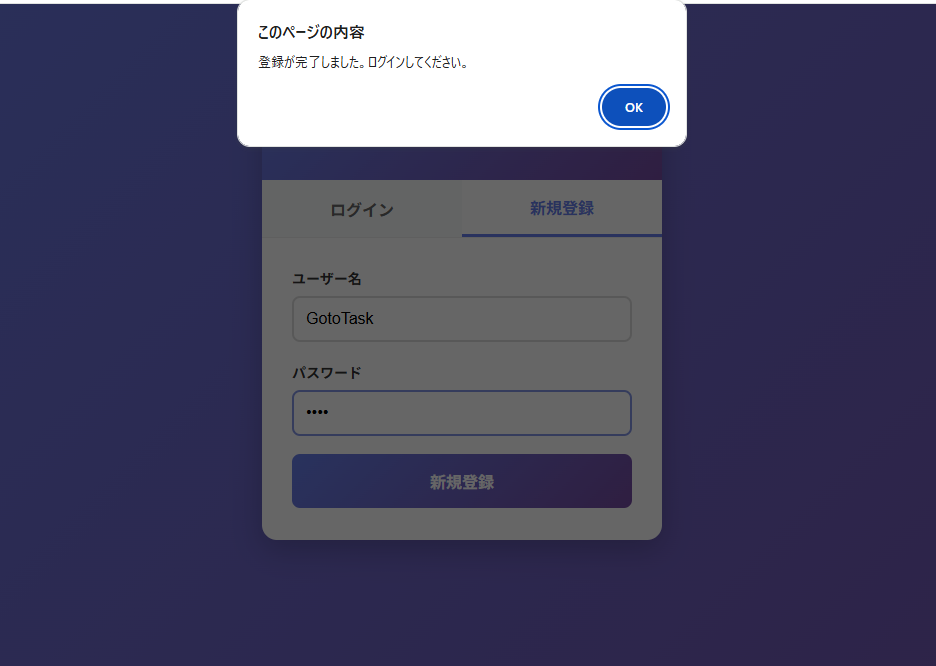
I entered the registered details on the login tab and logged in successfully.
Testing by creating a sample task, I confirmed that the operation is also normal.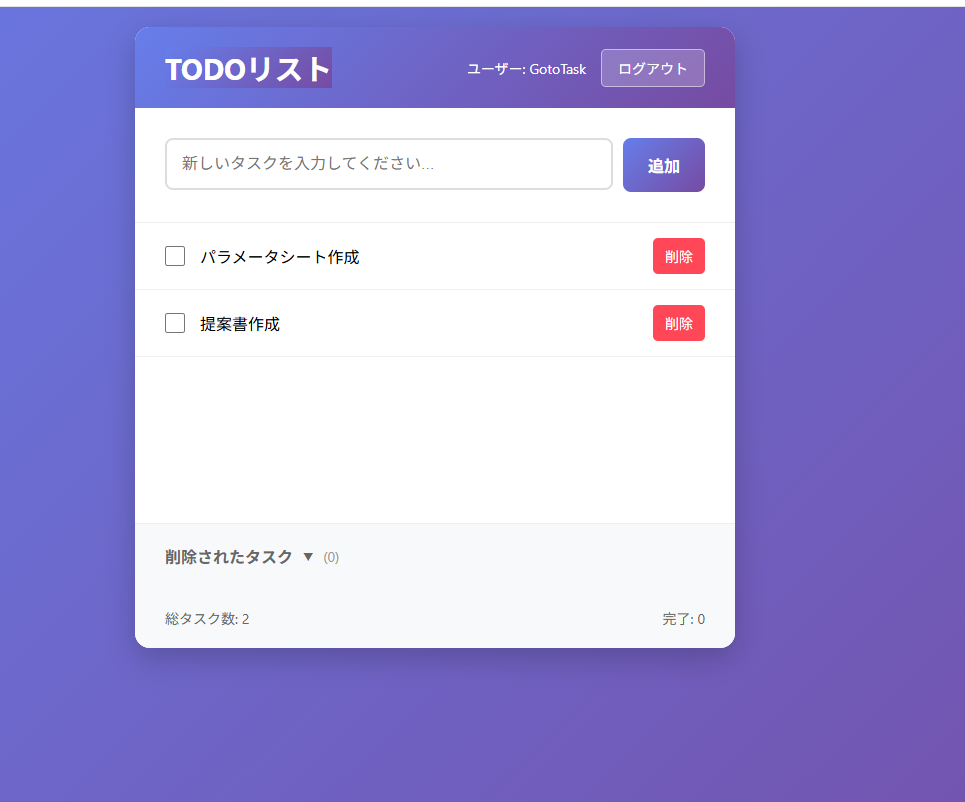
2. Confirming Application of "storagekeyrule.md"
Next, I want to verify if tasks can be saved within individual users.
In addition to "GotoTask," I registered "TestUser." I'll try logging in after registration.
The tasks created earlier with "GotoTask" were not displayed.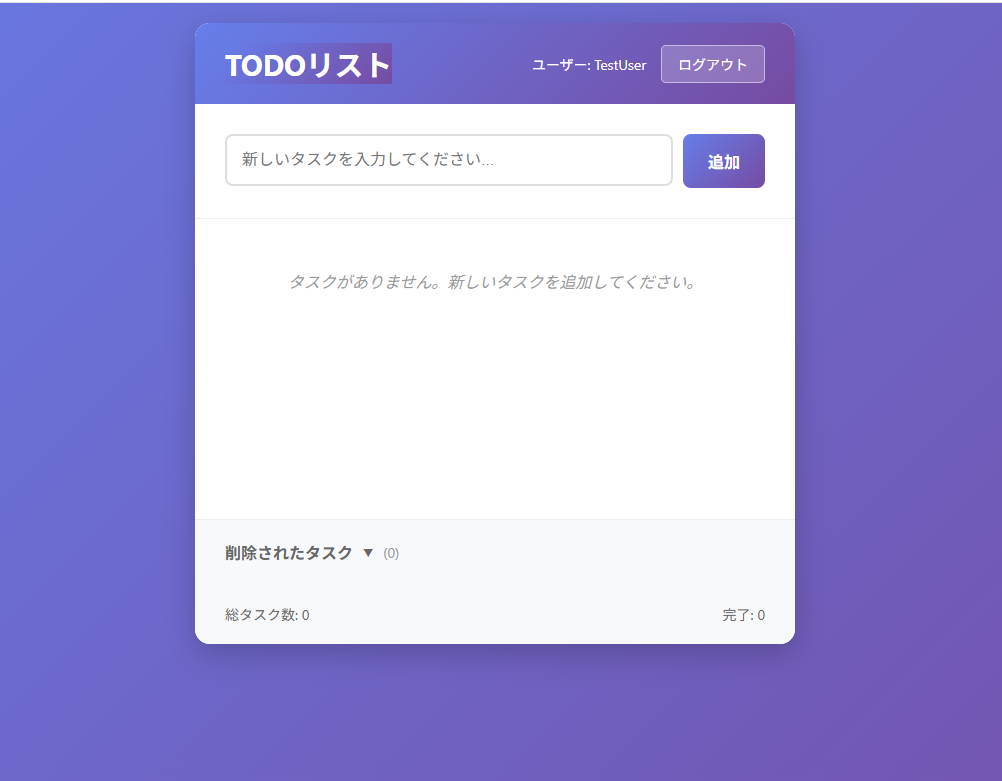
Now, I'll create a sample task with "TestUser" and log out.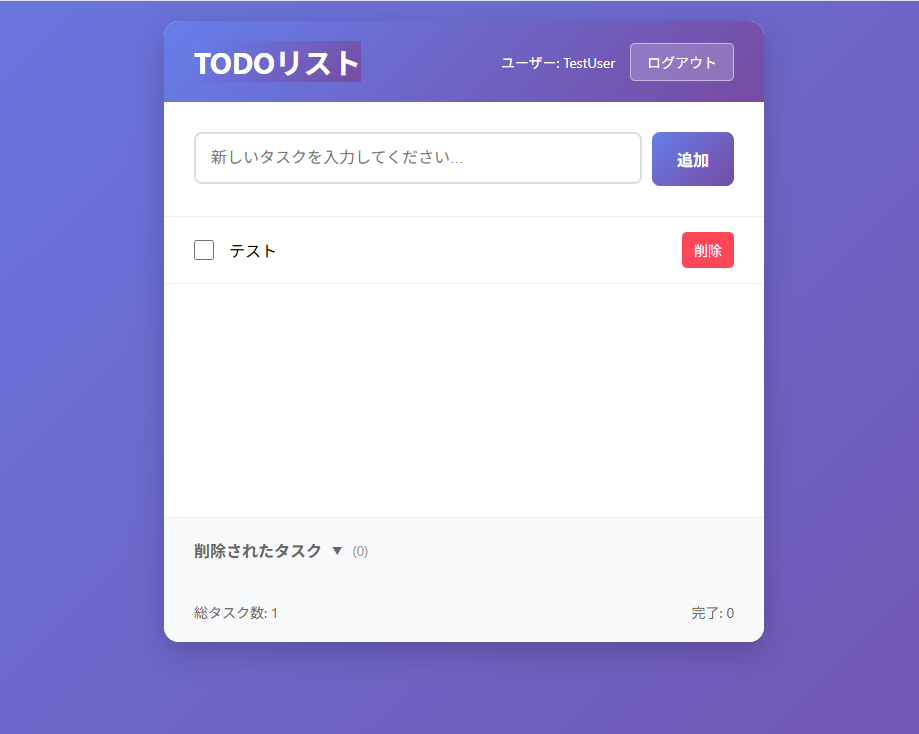
Logging back into "GotoTask."
The task from "TestUser" was not reflected, and only the tasks for "GotoTask" were displayed.
This confirms that information is stored specifically for each user and correctly identified!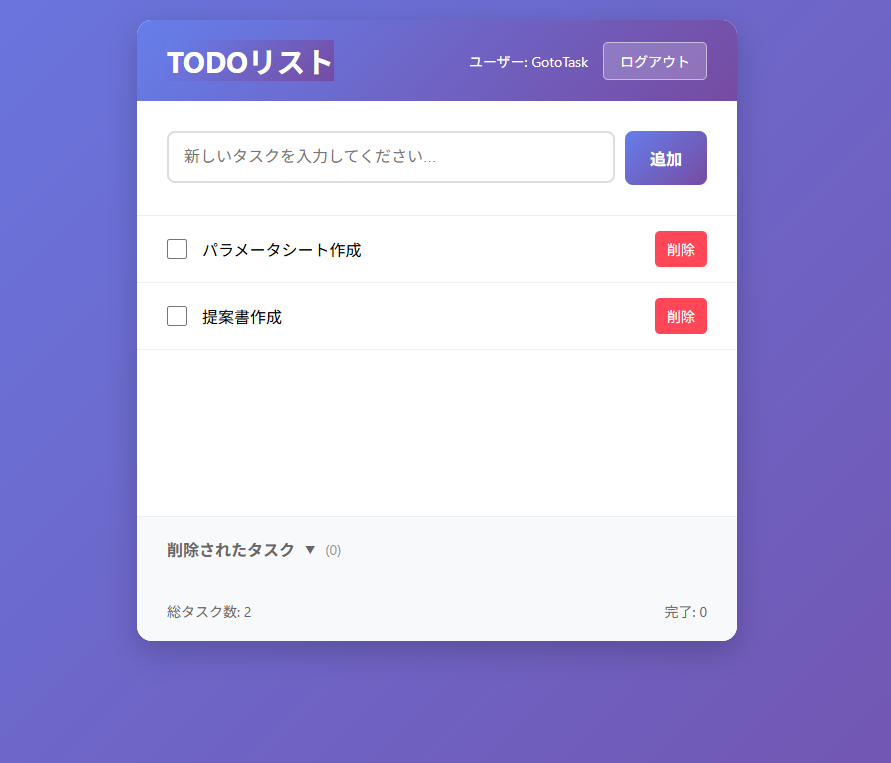
Conclusion
Through this demo, I reconfirmed the convenience of AWS Kiro's Agent Steering feature. Beyond simple instructions for code generation, by pre-defining project-specific validation rules and architecture policies, the AI can propose implementation plans that truly grasp the developer's intent.
I believe this is a huge advantage for ensuring quality in team development. To save the effort of repeating instructions in every prompt and to maintain consistent quality, I highly recommend actively utilizing the Steering feature.
↓ QES will continue to actively share information about Kiro, so please stay tuned!
We aim to become Japan's #1 resource for Kiro! Our mission is to evangelize this technology by empowering end-users with top-tier education and technical support.
If you have requests such as "I want to know more about this service" or "Support for AWS environment construction and migration," please feel free to contact us via our Contact Form. For complex inquiries, our sales representatives will contact you directly. Also, check out the following links!
<QES Related Solutions/Blogs>
<The AWS Security Promotion Consortium, in which QES participates, has released a white paper>
※ Amazon Web Services, the ”Powered by Amazon Web Services” logo, and other AWS trademarks used in the blog are trademarks of Amazon.com, Inc. or its affiliates.